Dual-Mode Connectivity: Experience our wireless keyboard mouse combo, compatible with Windows&Mac! The plug-and-play 2.4G USB receiver provides stable connection to desktops/laptops, with a wireless range of up to 10 meters (33 feet). We've also included a type C adapter and two Bluetooth pairing options, making it easy to meet your typing needs on mobile devices such as iPads and phones
Ergonomic Design, Zero Aches: Enhance comfort with this wireless ergonomic keyboard, featuring a wrist rest and adjustable tilt bracket that offers a 7 ° typing angle. The ergonomic mouse also provides a suitable resting angle for the fingers. The design reduces wrist strain during extended use, providing all-day support for comfortable typing
Fashion Backlight Modes: This backlit wireless keyboard offers 8 color backlit modes: 7 single color, 1 breathing cycle backlight, meeting your personalized settings in different scenes and emotions. 3 adjustable brightness options for a comfortable experience
Whisper-Quiet Typing Experience: The silent keyboard features a scissor structure (X-structure), which lowers key height and adjusts the force point for each key—minimizing typing noise to the greatest extent. Enjoy ultra-quiet keystrokes that are ideal for offices, libraries, or late-night use where silence is essential
Efficient Mouse: This wireless mouse features a comfortable grip angle, silent buttons, supports three levels of DPI adjustment, a built-in stylish colorful backlighting system, and Type-C fast charging, making it an excellent choice for premium accessories
Ultra-Slim Design with Holder: Our wireless computer keyboards feature a compact build and are half as thin as other keyboards, making it ideal for small desk and mobile work setups. The built-in stand holds mobile devices, ensuring you don't miss messages on your phone or iPad, and also making your desktop space cleaner
Please fully charge the device before using it after receiving the package. When the Bluetooth encounters a new device, please long press mode button until indicator flashes rapaidly.Fn+S: Switch to MAC mode. Any questions, please message our customer service.


 Hamile Bands Compatible with Fitbit Charge 4 / Fitbit Charge 3 / Fitbit Charge 3 SE, Waterproof Replacement Watch Strap Fitness Sport Band Wristband for Women Men, Large, Black
KWD 5.500
Hamile Bands Compatible with Fitbit Charge 4 / Fitbit Charge 3 / Fitbit Charge 3 SE, Waterproof Replacement Watch Strap Fitness Sport Band Wristband for Women Men, Large, Black
KWD 5.500
 -23%
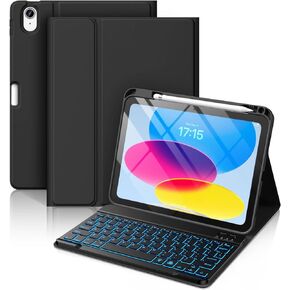
Hamile for iPad 10th Generation Case with Keyboard - Keyboard Case for iPad 10.9 Inch, 7 Colors Backlit Wireless Detachable Folio Keyboard Cover with Pencil Holder for Latest iPad 10th Gen (Black)
KWD 11.500
-23%
Hamile for iPad 10th Generation Case with Keyboard - Keyboard Case for iPad 10.9 Inch, 7 Colors Backlit Wireless Detachable Folio Keyboard Cover with Pencil Holder for Latest iPad 10th Gen (Black)
KWD 11.500
 Hamile Keyboard Case for iPad 9th 8th 7th Generation Case with Keyboard 10.2" - 7 Colors Backlit Detachable Folio Keyboard Cover with Pencil Holder for iPad Pro 10.5" / iPad Air 3rd Gen (Black)
KWD 14.500
Hamile Keyboard Case for iPad 9th 8th 7th Generation Case with Keyboard 10.2" - 7 Colors Backlit Detachable Folio Keyboard Cover with Pencil Holder for iPad Pro 10.5" / iPad Air 3rd Gen (Black)
KWD 14.500
 -17%
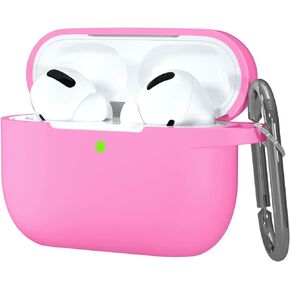
Night-Glow AirPods Pro Case Cover, Hamile Silicone Cases with Keychain Accessories for Apple Airpod Pro 1st/2nd Case 2019 2022, Women Men
KWD 2.500
-17%
Night-Glow AirPods Pro Case Cover, Hamile Silicone Cases with Keychain Accessories for Apple Airpod Pro 1st/2nd Case 2019 2022, Women Men
KWD 2.500




