- التسوق ، اصبح سهلا.
- /
- احصل على التطبيق!
For Note 20 Screen Protector Tempered Glass and Camera Lens Protector
Only for Samsung Note 20 5G Screen Protector
Installation procedure:
1.Clean the dust from the screen with a wet and dry paper towel
2.Carefully peel off the old screen protector
3.The new screen protector completely cover to the phone screen
4.Press the fingerprint identification ring outward to ensure that there are no bubbles (importance)
5.Tightly press the edges about 45s of the screen protector to avoid edge lifting
6.After pasting the toughened film, delete the stored fingerprint, add a new fingerprint identification
NOTE:
Clean the screen with cleaning stickers,carefully peel off the back of the screen protector
Delete the old fingerprint,enter the new fingerprint,achieve fast fingerprint unlock
Product features we have:
9H hardness tempered glass, strong resistance abrasions, scratches, Oil resistant coating makes your phone screen clean and beautiful
Compatible with fingerprint unlocking, high-definition clarity, without affecting the native touch sensation of the screen
Full screen coverage provides dual protection, easy to install, no bubbles
Screen protector friendly to your phone case, scratch resistant and tear resistant
Package:
3 x pack for Note 20 Glass Screen Protector
2 x pack for Note 20 Camera Lens Protector
3 x pack Wet and Dry Wipes
1 x pack Installation manual
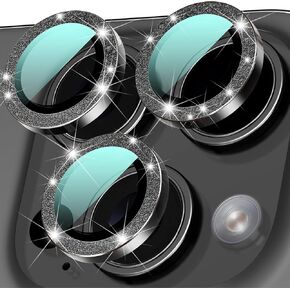 2 حزمة العدسة كاميرا حزمة لجهاز iPhone 16 Pro/16 Pro Max Aluminium Camery Coampy ، عصا حازمة ، ودية ، وحيدة العدسة المضادة للاعتماد على iPhone 16 Pro Max Glass Lens
KWD 4.500
2 حزمة العدسة كاميرا حزمة لجهاز iPhone 16 Pro/16 Pro Max Aluminium Camery Coampy ، عصا حازمة ، ودية ، وحيدة العدسة المضادة للاعتماد على iPhone 16 Pro Max Glass Lens
KWD 4.500
 2Pack لـ iPhone 16 Pro LCD Display OEM OEM أصلي ملصقات شريط لاصقة مقاومة للماء الغراء لـ iPhone 16 Pro 6.3 بوصة A3294 شريط إطار الإسكان الأمامي (16 Pro)
KWD 3
2Pack لـ iPhone 16 Pro LCD Display OEM OEM أصلي ملصقات شريط لاصقة مقاومة للماء الغراء لـ iPhone 16 Pro 6.3 بوصة A3294 شريط إطار الإسكان الأمامي (16 Pro)
KWD 3
 واقي الشاشة الزجاجية المضادة للبباعة لـ iPhone 15Pro Max ، وتركيب التخلص من الغبار التلقائي ، واضحة ، واضحة ، خالية من الفقاعات ، تسهيل التثبيت
KWD 4
واقي الشاشة الزجاجية المضادة للبباعة لـ iPhone 15Pro Max ، وتركيب التخلص من الغبار التلقائي ، واضحة ، واضحة ، خالية من الفقاعات ، تسهيل التثبيت
KWD 4
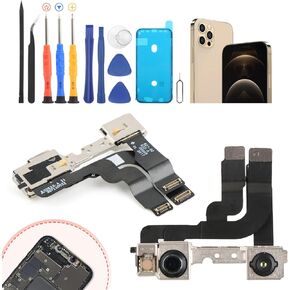 ywlrong for iPhone 12 Pro Max Pront Camera Replacement for iPhone 12 Pro Max Max Modile Module Camera Flex Cable مع أجزاء إصلاح إكسسوارات Flex Cables مع الأدوات
KWD 4
ywlrong for iPhone 12 Pro Max Pront Camera Replacement for iPhone 12 Pro Max Max Modile Module Camera Flex Cable مع أجزاء إصلاح إكسسوارات Flex Cables مع الأدوات
KWD 4




