- التسوق ، اصبح سهلا.
- /
- احصل على التطبيق!
Bone Conduction Glasses with upgraded sound system will provide you with more immersive sound quality, Open-ear design allow you to listen to music but meanwhile to keep aware of your surrounding.
Specifications:
1. Upgraded Bone Conductive headphones will provide more immersive and clearer sound quality.
2. Open-Ear Design keeps your alert to your surrounding while you listen to music/Podcast, which is especially convenient for office or warehouse working place. With these smart glasses, you can have your work done well in an especially good mood.
3. Photochromic and Blue light blocking all in one lenses: the functional glasses keep clear when you at home/work and reduce blue light emitting from computers or cell phone devices. When you step outside under sunlight, they will get tint base on the sunlight intensity.
4. Compatible with Bluetooth system: the Bluetooth glasses adopted with True wireless Bluetooth connection. Pls do read the user manual or watch the operation video first for easy operation.
5. Voice Assistance: after connected with Bluetooth device, you can just double click the button of glasses to activate voice assistance like siri.
6. Durable TR90 frame: Lightweight, Impact-resistant, High heat resistance
7. IP66 Waterproof
8. Easy-to-use Magnetic charging
Operations:
▼TURN ON: In the OFF status, press and hold the one-sided ON/OFF button for 3 sec to turn on left or right frame leg, followed by a voice prompt “Power On”. While press and hold both-sided ON/OFF button for 3 sec to turn on both left and right frame legs. Followed by a voice prompt “Power On”.
▼TURN OFF: In the ON status, press and hold the one-sided ON/OFF button for 3 sec to turn off left or right frame leg, followed by a voice prompt “Power Off”; While press and hold both-sided ON/OFF button for 3 sec to turn off both left and right frame legs. Followed by followed by a voice prompt “Power Off”.
▼BLUETOOTH CONNECTION: In the OFF status, press and hold either side ON/OFF button for 3 sec to power on left or right frame only, e.g. turn on left side frame. After then, press and hold the ON/OFF button of the other side frame for 10 sec,till the blue and red light simultaneously flash and accompanied with voice prompt first “Power On” and then turn to “Pairing”. (The side in pairing status is the main connection side)
Locate the Bluetooth menu on the device you are using and select “Rocklion“, then click it for Pairing. A voice prompt "connected" can be heard when pairing has succeeded.
▼VOICE ASSISTANCE:When glasses connected with Bluetooth, double clicking the button of the main connection side with Bluetooth to activate the Voice Assistant (also called Voice Recognition).
What is Included in Box:
1. A pair of glasses
2. Earplugs
3. Cloth pouch
4. Magnetic Charging Cable
5. Exquisite Box
Note:Should there are any using questions, pls just feel free to contact via Amazon, we will always provide timely and workable solutions.
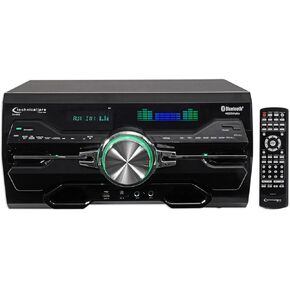 التقنية Pro Professional 4000W Receiver/Amplifier/DVD Player Bluetooth/USB/FM
KWD 88.500
التقنية Pro Professional 4000W Receiver/Amplifier/DVD Player Bluetooth/USB/FM
KWD 88.500
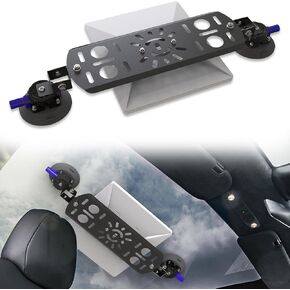 Starlink Mini Mount للسيارة ، مجموعة Starlink Mini Mount Metal Kit مع كوب شفط لسقف السيارة وسقف السقف ، وملحقات Holder Mini Star Link للمعسكر ، و RVs ، والشاحنات ، والسيارات
KWD 13.500
Starlink Mini Mount للسيارة ، مجموعة Starlink Mini Mount Metal Kit مع كوب شفط لسقف السيارة وسقف السقف ، وملحقات Holder Mini Star Link للمعسكر ، و RVs ، والشاحنات ، والسيارات
KWD 13.500
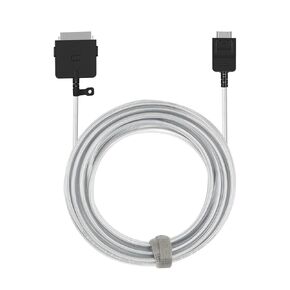 BN39-02577A استبدال كبل اتصال واحد لمربع تلفزيون Samsung QN85Q950TSF QN75Q950TSF QN65Q950TSF QE85Q950TSTXZU QE65Q950TSTXXN
KWD 40.500
BN39-02577A استبدال كبل اتصال واحد لمربع تلفزيون Samsung QN85Q950TSF QN75Q950TSF QN65Q950TSF QE85Q950TSTXZU QE65Q950TSTXXN
KWD 40.500
 -11%
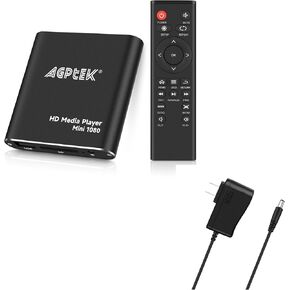
HDMI Media Player مع محول طاقة آخر ، Black Mini 1080p Full-HD Ultra HDMI Media Player for -MKV/RM- HDD USB وبطاقات SD
KWD 19.500
-11%
HDMI Media Player مع محول طاقة آخر ، Black Mini 1080p Full-HD Ultra HDMI Media Player for -MKV/RM- HDD USB وبطاقات SD
KWD 19.500




