- التسوق ، اصبح سهلا.
- /
- احصل على التطبيق!
Specification:
Item Type: Wifi Microscope
Sensor: CMOS 300,000
Main Control Chip: 24Bit DSP
Static Resolution: 1600x1200 (interpolated 2 million)
Image Resolution: 1600x1200 (interpolated 2 million)
Battery: Lithium battery 1400 mAh (built-in battery shipped)
Charging Power Supply: Micro-USB (5V DC)
Purpose: Used to observe small items
How to Use:
1. Scan the QR code on the manual to download and install the dedicated APP
2. Remove the lens
of the microscope before use
3. Long press the top power button for 3 seconds to turn on the microscope power
4. The mobile phone uses WIFI to connect to the hotspot named UMWCAM
5. Open the installed microscope supporting application to use
6. When observing, the bottom of the microscope should be close to the object to be observed, and slowly turn the focus knob to focus
Package List:
1 x Wifi Microscope1 x USB Cable
1 x English User Manual
 غشاء قزحية، فتحة مجهر قابلة للتعديل SK6 SK8 SK12 SK23 SK25 مجهر محول قزحية غشاء بصري لعدسات المجهر (SK25 مع قاعدة)
KWD 5.500
غشاء قزحية، فتحة مجهر قابلة للتعديل SK6 SK8 SK12 SK23 SK25 مجهر محول قزحية غشاء بصري لعدسات المجهر (SK25 مع قاعدة)
KWD 5.500
 -10%
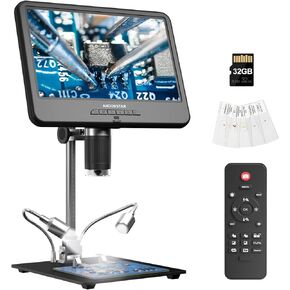
اندوستار مجهر رقمي AD210 بشاشة LCD 10.1 انش للحام، مجهر عملات معدنية رؤية كاملة للعملات المعدنية الخاطئة مع ضوء، مجهر الكتروني 10.1 انش، حامل معدني 10.1 انش، بطاقة SD 32G
KWD 37
-10%
اندوستار مجهر رقمي AD210 بشاشة LCD 10.1 انش للحام، مجهر عملات معدنية رؤية كاملة للعملات المعدنية الخاطئة مع ضوء، مجهر الكتروني 10.1 انش، حامل معدني 10.1 انش، بطاقة SD 32G
KWD 37
 مجهر الجيب المضيء من United Scientific MCR30X، تكبير 30x، يعمل بالبطارية
KWD 7.500
مجهر الجيب المضيء من United Scientific MCR30X، تكبير 30x، يعمل بالبطارية
KWD 7.500
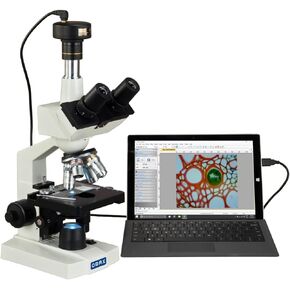 مجهر LED لمختبر رقمي 40X-2000X من أوماكس مع كاميرا رقمية 5 ميجابكسل ومرحلة ميكانيكية ثنائية الطبقات
KWD 182.500
مجهر LED لمختبر رقمي 40X-2000X من أوماكس مع كاميرا رقمية 5 ميجابكسل ومرحلة ميكانيكية ثنائية الطبقات
KWD 182.500




