- التسوق ، اصبح سهلا.
- /
- احصل على التطبيق!
Simple 3-step setup:
1. Plug the extender into a power outlet near the router. Wait for about 20 seconds until the repeater's on indicator light blinks slowly;
2. Go to your phone's WiFi connection page and select "Repeater-XXX" to connect. (If you cannot find the name of the repeater WIFI, it is recommended to turn on your phone's airplane mode and then turn off the airplane mode). ;
3. Connect to "Repeater-XXX" and then jump directly to the browser page to set the WIFI information of the repeater, note that the password of the repeater set inside needs to be the same as the WIFI password of the router!!! If you can not jump automatically, enter 192.168.11.1 in this browser;
Frequently asked questions
1、Q: Mobile phone settings or computer settings?
A: Mobile phone or computer can be set. Recommend cell phone setting, more convenient and fast.
2. Q: Can't find the wifi name of the repeater?
A:Press and hold the RESET button for 5 seconds on the side of the repeater using the card pin included in the box, then open the airplane mode on your phone and then close it, and search the network again.
3. Q: Why didn't it jump to the repeater setting page?
A: First, make sure the cell phone (or computer) is connected to the "Repeater-XXX" WIFI, if it is not automatically jumped to the settings page, manually enter 192.168.11.1 to enter the settings.
4. Q: Why is there still no network for the repeater after the setup is completed?
A: Check whether the WIFI password set by the repeater is the same as the WIFI password of the superior router, this must be consistent.
5. Q: Is the signal unstable and intermittent?
A: The distance between the repeater and the router is too far, you should reduce the distance between them.
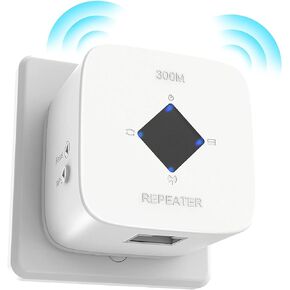 موسع واي فاي، معزز إشارة موسعات واي فاي للمنزل، 2023 أحدث معزز واي فاي ومضخم إشارة يصل إلى 3000 قدم مربع، معزز الإنترنت، مكرر مع منفذ إيثرنت ونقطة وصول، إعداد بنقرة واحدة، 2.4 جيجا هرتز
KWD 7
موسع واي فاي، معزز إشارة موسعات واي فاي للمنزل، 2023 أحدث معزز واي فاي ومضخم إشارة يصل إلى 3000 قدم مربع، معزز الإنترنت، مكرر مع منفذ إيثرنت ونقطة وصول، إعداد بنقرة واحدة، 2.4 جيجا هرتز
KWD 7
 EGEN حامل حافظة من السيليكون المغناطيسي حزام مضاد للضياع مع قلادة إكسسوارات من اللؤلؤ البلاستيكي الأبيض والنحاس لأجهزة Airpods Pro 3 2 1
KWD 6
EGEN حامل حافظة من السيليكون المغناطيسي حزام مضاد للضياع مع قلادة إكسسوارات من اللؤلؤ البلاستيكي الأبيض والنحاس لأجهزة Airpods Pro 3 2 1
KWD 6
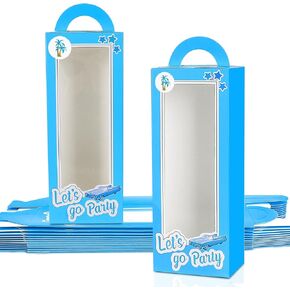 EGEN 12 قطعة من صناديق هدايا الحفلات الزرقاء، أكياس جودي، هدايا الحفلات الزرقاء، صناديق هدايا الدمى الزرقاء، صناديق الحلوى للفتيات والفتيان، صناديق هدايا لحفلات أعياد الميلاد وحفلات التخرج (أزرق 12 حزمة)
KWD 4
EGEN 12 قطعة من صناديق هدايا الحفلات الزرقاء، أكياس جودي، هدايا الحفلات الزرقاء، صناديق هدايا الدمى الزرقاء، صناديق الحلوى للفتيات والفتيان، صناديق هدايا لحفلات أعياد الميلاد وحفلات التخرج (أزرق 12 حزمة)
KWD 4
 -50%
egen Kawaii College سترة بغطاء للرأس لطيفة كبيرة الحجم Sweet Cool Cute Piggy مبطنة سميكة معطف الطالبات
KWD 5.500
-50%
egen Kawaii College سترة بغطاء للرأس لطيفة كبيرة الحجم Sweet Cool Cute Piggy مبطنة سميكة معطف الطالبات
KWD 5.500




