مع رأس سلك كشف درجة الحرارة: نطاق عرض درجة الحرارة هو -99 درجة -999 درجة، الوحدة C تعني درجة حرارة مئوية، وF تعني درجة حرارة فهرنهايت. يمكن تبديل وحدة درجة الحرارة عن طريق الضغط لفترة قصيرة على مفتاح "+".
يتم التعبير عن إجمالي استهلاك المياه باللتر باللتر والجالون بالجالون، وتكون الوحدة مقبولة.
مدعوم ببطاريات AAA (غير متضمنة): يذهب هذا النظام إلى وضع السكون عند تركه دون مراقبة وبدون تدفق الماء.
إعادة ضبط إجمالي استهلاك المياه: يوجد رمز إعادة الضبط على الجزء الخلفي من لوحة الدائرة مع وجود جهتي اتصال بجانبه. سيؤدي تقصير الوصلتين بعد تشغيل النظام إلى مسح إجمالي استهلاك المياه. يمكنك أيضًا الضغط مع الاستمرار على زر SET، وبعد يومض الرقم، استخدم علامتي "+" و"-" لتعديله إلى 0.
حرف إعداد قيمة K (K SETTING): سيتم عرض حرف إعداد قيمة K عند الدخول إلى واجهة إعداد قيمة K

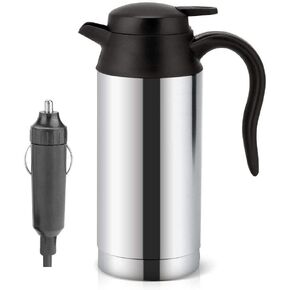 غلاية سيارة، غلاية سيارة كهربائية محمولة من الفولاذ المقاوم للصدأ سعة 750 مل، كوب قهوة للسيارة مع شاحن ولاعة سجائر وعاء غلاية كهربائي كوب ماء ساخن - 100 درجة مئوية مع ضوء LED إيقاف تلقائي (12 فولت)
KWD 11.500
غلاية سيارة، غلاية سيارة كهربائية محمولة من الفولاذ المقاوم للصدأ سعة 750 مل، كوب قهوة للسيارة مع شاحن ولاعة سجائر وعاء غلاية كهربائي كوب ماء ساخن - 100 درجة مئوية مع ضوء LED إيقاف تلقائي (12 فولت)
KWD 11.500
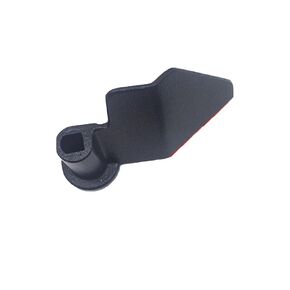 عبوة من قطعتين من مجداف صانع الخبز من ليلوكي، شفرة صانع الخبز مصنوعة من طلاء غير لاصق + مادة فولاذية كربونية، قطع بديلة لآلة صنع الخبز
KWD 4
عبوة من قطعتين من مجداف صانع الخبز من ليلوكي، شفرة صانع الخبز مصنوعة من طلاء غير لاصق + مادة فولاذية كربونية، قطع بديلة لآلة صنع الخبز
KWD 4
 تيار مستمر التبديل الحالي ، مرحل الاستشعار الحالي تيار مستمر الاستشعار الحالي التبديل 0-300A أمبير مراقبة الاستشعار التتابع D366
KWD 11.500
تيار مستمر التبديل الحالي ، مرحل الاستشعار الحالي تيار مستمر الاستشعار الحالي التبديل 0-300A أمبير مراقبة الاستشعار التتابع D366
KWD 11.500
 EQ Pedal 10 Band Equalizer عشرة نطاقات EQ تأثيرات الجيتار دواسة لـ 4 أوتار، 5 أوتار باس و6 أوتار، 7 أوتار جيتار كهربائي و31.25 هرتز إلى 16 كيلو هرتز (10 نطاقات)
KWD 6
EQ Pedal 10 Band Equalizer عشرة نطاقات EQ تأثيرات الجيتار دواسة لـ 4 أوتار، 5 أوتار باس و6 أوتار، 7 أوتار جيتار كهربائي و31.25 هرتز إلى 16 كيلو هرتز (10 نطاقات)
KWD 6




