- Shopping, made easy.
- /
- Get the app!
iDaPro Imported PET film Screen Protector prevent your watch screen from scratches and drops without reducing clarity or responsiveness.
Package Included:
4 x iDaPro PET Film Screen Protector for Garmin Fenix 5X Plus / Fenix 5X 51mm smartwatch Screen (Note:PET Screen Protector,Not Tempered Glass)
4 x Wet Wipes and Dry Wipes
4 x Dust-absorber/Guide Sticker
1 x Installation Guide
Frequently Asked Questions:
1.Does the screen protector cover the whole screen? Why is it smaller than my watch's screen?
A little smaller than the screen makes it easier to install. And it is not easy to damage and get bubbles.
2.How can I remove a Scratched screen protector?
Lift the screen protector with your nails or hard cards from any corner . Once the corner has been lifted off the device, hold the corner and remove SLOWLY.

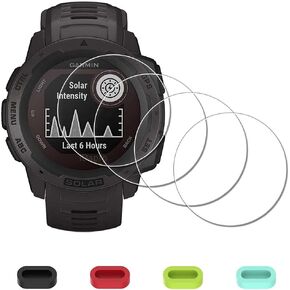 iDaPro Screen Protector for Garmin Instinct Solar Tactical/Instinct | 4-Pack + 4 Dust Plugs + ABS Box. For Solar Tactical/Tactical. 9H Hardness, Anti-Scratch, Anti-Bubble, HD Clarity
KWD 5.500
iDaPro Screen Protector for Garmin Instinct Solar Tactical/Instinct | 4-Pack + 4 Dust Plugs + ABS Box. For Solar Tactical/Tactical. 9H Hardness, Anti-Scratch, Anti-Bubble, HD Clarity
KWD 5.500
![iDaPro [4 Pack] Screen Protector for Garmin Approach S62 Golf Watch + Silicone Anti-dust Plugs Tempered Glass Anti-Scratch Bubble-Free Easy Installation in Kuwait](https://cdn1.tilga.com/md/prod/2/412/3/49289941.13857.jpg) iDaPro [4 Pack] Screen Protector for Garmin Approach S62 Golf Watch + Silicone Anti-dust Plugs Tempered Glass Anti-Scratch Bubble-Free Easy Installation
KWD 5.500
iDaPro [4 Pack] Screen Protector for Garmin Approach S62 Golf Watch + Silicone Anti-dust Plugs Tempered Glass Anti-Scratch Bubble-Free Easy Installation
KWD 5.500
![iDaPro [4 Pack] Screen Protector for Garmin Vivoactive 3 Watch (Not for Vivoactive 3 Music) + Silicone Anti-dust Plugs Tempered Glass Anti-Scratch Bubble-Free Easy Installation in Kuwait](https://cdn1.tilga.com/md/prod/3/6641/3/165374820.29258.jpg) iDaPro [4 Pack] Screen Protector for Garmin Vivoactive 3 Watch (Not for Vivoactive 3 Music) + Silicone Anti-dust Plugs Tempered Glass Anti-Scratch Bubble-Free Easy Installation
KWD 5.500
iDaPro [4 Pack] Screen Protector for Garmin Vivoactive 3 Watch (Not for Vivoactive 3 Music) + Silicone Anti-dust Plugs Tempered Glass Anti-Scratch Bubble-Free Easy Installation
KWD 5.500
![iDaPro Screen Protector for Polar Ignite 2 / Ignite Watch [4 Pack] Tempered Glass Anti-Scratch Bubble-Free Easy Installation in Kuwait](https://cdn1.tilga.com/md/prod/2/421/3/49447522.6036.jpg) iDaPro Screen Protector for Polar Ignite 2 / Ignite Watch [4 Pack] Tempered Glass Anti-Scratch Bubble-Free Easy Installation
KWD 5.500
iDaPro Screen Protector for Polar Ignite 2 / Ignite Watch [4 Pack] Tempered Glass Anti-Scratch Bubble-Free Easy Installation
KWD 5.500




