Attention: If you buy this device, you need to support docking station, TYPE-C to DP, USB C, thunderbolt, MAC. You must purchase our Type c to dp 1.4 kvm switch cable(ASIN: B0CM5X6F1W). Only this ASIN cable can support that, which requires additional purchase.
【Attention】: Not EDID emulation.Please ensure that the HDMI output monitor is set to the HDMI signal source, while the DP monitor should be set to the DP signal source. The monitor setting button is generally located on the bottom or back of the monitors.
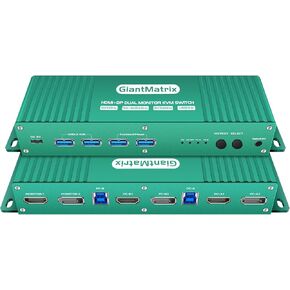
【kvm switch 2 monitors 2 computers displayport and hdmi】This display port HDMI kvm switch dual monitor 2 computers helps you to Hook up 2 computers to share one set of keyboard, mouse with hotkey,and there are three modes ,videowall,dual extended or mirrored monitors, with 1 extra high speed USB 3.0 hub port for sharing USB peripheral; Perfect for IT specialist, gaming(with high Frame), and other multi tasks,
【kvm switch displayport hdmi】No need to install driver, Supports hotkey switching,The housing is made of aircraft aluminium and the connector is gold plated, resistant to unplugging, interference, corrosion and fast heat dissipation.
【DisplayPort+HDMI KVM Switch 2 monitors 2 computers】2 computers 2 monitors KVM Switch - Control two computers with HDMI and DP interfaces, along with other compatible devices, using a single keyboard and mouse. Connect one HDMI monitor and one DP monitor. Enjoy separate audio and microphone output, as well as a USB 3.0 HUB
【Dual monitor kvm switch displayport hdmi】HDMI2.1 + DP2.0KVM Switch , RGB 4:4:4 HDR10+, HDMI 2.0 and DP1.4 compatible. Supported resolutions:8K@60Hz, 4K@144Hz, 4K@240Hz , 2560x1440@144Hz 165Hz and 5120*1440@120Hz 1440P 60Hz 75Hz 100Hz 120Hz 144Hz 165hz 175hz 240hz. Final resolution is also subject to graphic cards, monitors, cables and adapters and there work together;


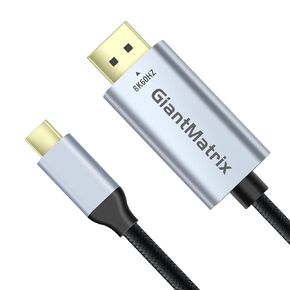 GiantMatrix USB C to DisplayPort kvm Switch Cable ,Support 8K@60Hz, 4K@144Hz, 2K@240Hz, 5K Type C to DP 1.4 Cable, Compatible for MacBook Pro M1 M2, Mac Studio, Mac Mini, XPS, 6 ft
KWD 9
GiantMatrix USB C to DisplayPort kvm Switch Cable ,Support 8K@60Hz, 4K@144Hz, 2K@240Hz, 5K Type C to DP 1.4 Cable, Compatible for MacBook Pro M1 M2, Mac Studio, Mac Mini, XPS, 6 ft
KWD 9
 KVM Switch 1 Monitors 2 Computers HDMI EDID Emulator 4K 60Hz kvm Switch hdmi 2K 144Hz EDID Copy hdmi 2.0 kvm edid Clone 3440 * 1440 100hz 2 Port hdmi kvm Switch edid usb3.0 XJL
KWD 117
KVM Switch 1 Monitors 2 Computers HDMI EDID Emulator 4K 60Hz kvm Switch hdmi 2K 144Hz EDID Copy hdmi 2.0 kvm edid Clone 3440 * 1440 100hz 2 Port hdmi kvm Switch edid usb3.0 XJL
KWD 117
 hdmi displayport kvm Switch 2 Monitors 2 Computer 144Hz Hotkey Switching Dual Monitor kvm Switch displayport hdmi 165hz displayport hdmi kvm 2 Monitors 2 Computers FreeSync G-SYNC GiantMatrix
KWD 66.500
hdmi displayport kvm Switch 2 Monitors 2 Computer 144Hz Hotkey Switching Dual Monitor kvm Switch displayport hdmi 165hz displayport hdmi kvm 2 Monitors 2 Computers FreeSync G-SYNC GiantMatrix
KWD 66.500
 KVM Switch DisplayPort 2 Port Kvm Switch 1 Monitors 2 Computers Display Port Monitor Selector Box 1440P 120Hz 144Hz 165Hz 175Hz 240Hz DP2.1 KVM Displayport USB 3.0 FreeSync G-SYNC
KWD 20.500
KVM Switch DisplayPort 2 Port Kvm Switch 1 Monitors 2 Computers Display Port Monitor Selector Box 1440P 120Hz 144Hz 165Hz 175Hz 240Hz DP2.1 KVM Displayport USB 3.0 FreeSync G-SYNC
KWD 20.500




