- Shopping, made easy.
- /
- Get the app!
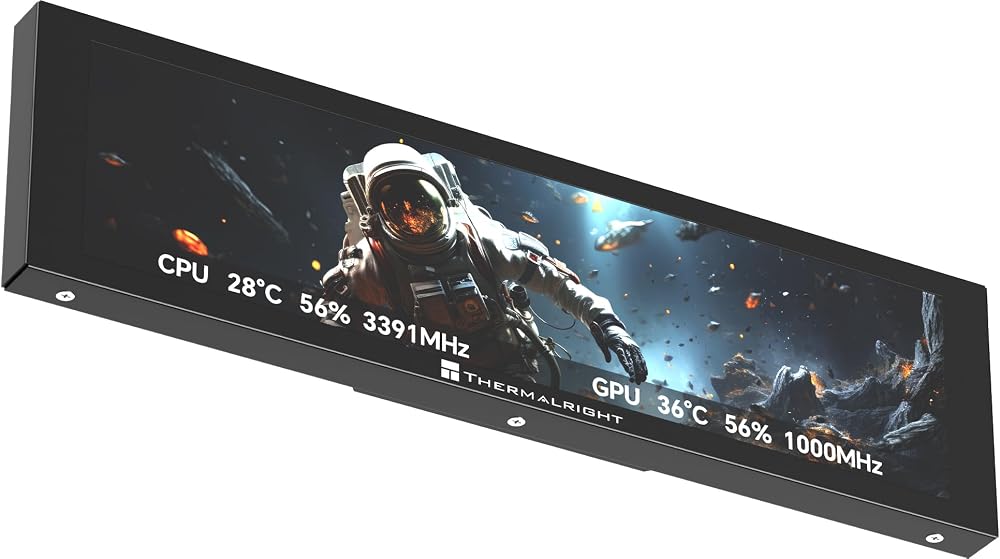
Thermalright Trofeo Vision LCD Display is a slim full-color LCD screen for PC builders who want real-time hardware monitoring and a cleaner visual upgrade inside their desktop setup. It is suitable for gaming PC users, AIO cooler builds, streamers, creators, and case modders who want to show CPU/GPU temperature, fan speed, memory usage, performance data, preset themes, or personalized visuals at a glance.
With TRCC software, the display supports real-time monitoring, data transfer, DIY layout control, preset interface themes, and display on/off functions. It helps users check system status during gaming, benchmarking, rendering, streaming, or daily PC use, while adding a more customized look to the case. The magnetic mounting design allows flexible placement on compatible metal PC case panels.
The screen-side LCD connector uses USB Type-C. The digital display power supply and data communication are provided through the motherboard 9-pin USB header. Please confirm the USB connection is complete before installing the software.
Specification:
9.16-Inch: Dimension L251mm x W68mm x H17mm; Screen Resolution 1920 x 480; LCD Connector USB Type-C.
11.3-Inch: Dimension L272mm x W70mm x H14mm; Screen Resolution 1920 x 400; LCD Connector USB Type-C.
Software Notes: Download the software from the official Thermalright support page, extract the file, and double-click the installer to begin installation. Double-click the “TRCC” icon on the desktop to run the software. After installation, the program starts with the system and stays active in the background. Please do not force close it. If an unexpected issue occurs, reconnect the USB cable and restart the system.
All data above comes from the Thermalright laboratory and is for reference only.
 Thermalright Trofeo Vision LCD AIO Display 6.86" PC Monitor, USB Type-C Screen for Real-Time Hardware Monitoring, with Preset & DIY Themes for Gaming PC Case/CPU Cooler(Black)
KWD 14
Thermalright Trofeo Vision LCD AIO Display 6.86" PC Monitor, USB Type-C Screen for Real-Time Hardware Monitoring, with Preset & DIY Themes for Gaming PC Case/CPU Cooler(Black)
KWD 14
 Frozen Notte 240 Black ARGB V2 Water Cooling CPU Cooler,240Black CPU Cooler Specifications, Double PWM Fans, S-FDB Bearings, Suitable for AMD/AM4 AM5,Intel LGA 1700/1150/1151/1200/2011
KWD 0
Frozen Notte 240 Black ARGB V2 Water Cooling CPU Cooler,240Black CPU Cooler Specifications, Double PWM Fans, S-FDB Bearings, Suitable for AMD/AM4 AM5,Intel LGA 1700/1150/1151/1200/2011
KWD 0
 Thermalright HR-EB118 20G C Red M.2 External Enclosure-NVMe Protocol
KWD 8.500
Thermalright HR-EB118 20G C Red M.2 External Enclosure-NVMe Protocol
KWD 8.500
 Thermalright Usb2.0 to USB Type-C Cable White for The Wiring of Water-Cooled Radiator Display Screen,Connection Cable for Fw Series Water-Cooled Radiator Display Screen
KWD 3
Thermalright Usb2.0 to USB Type-C Cable White for The Wiring of Water-Cooled Radiator Display Screen,Connection Cable for Fw Series Water-Cooled Radiator Display Screen
KWD 3

