- التسوق ، اصبح سهلا.
- /
- احصل على التطبيق!
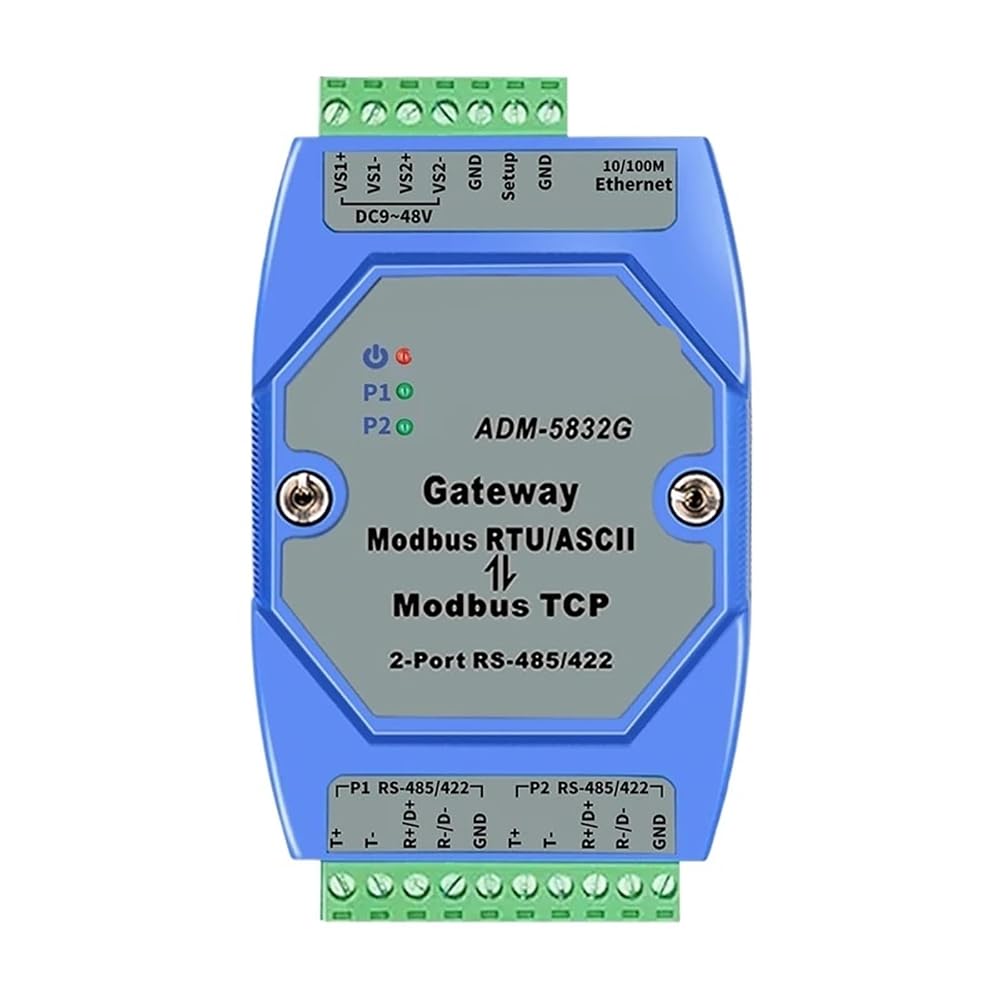

The ADM-5832G is an industrial-grade 2 serial RS-485/422 Modbus serial port device that allows users to easily integrate Modbus Ethernet devices with Modbus serial devices. DIN rail mounting, DC9-48V power supply, internal Integrated ModbusTCP, ModbusRTU and Modbus ASCII protocol.
1, MODBUS agreement in several categories, what is the difference?
MODBUS RTU:RS-485/422/232 serial communication, master-slave structure, a master, multi slave.
MODBUS ASCII:RS-485/422/232 serial communication, master-slave structure, a master, multi slave.
MODBUS: Standard 10/100M Ethernet port communication, master slave structure, multi master, multi slave.
2, under what circumstances do you use the MODBUS server?
(1) the RS-485 port collection terminal is connected to the PC of the configuration software through ethernet;
(2) PLC and touch screen need to communicate with RS-485 terminal when it is collected;
(3) multi host MODBUS protocol communication;
(4) MODBUS RTU protocol network access MODBUS protocol network.
2 Port RS485/422
MODBUS erver
ADM-5832G
Function Brief
MODBUS protocol is one of the most widely used protocols in the electronic equipment industry. It has become a universal industrial standard. Through this protocol, various MODBUS devices (such as PLC, DCS, HMI, various instruments, etc.) can communicate with each other through a network or serial link. Nevertheless, the MODBUS protocol that uses the serial port and the Ethernet is different, so a is needed to complete the communication transformation between the two protocols. ADM-5832G is a product dedicated to communicating MODBUS devices and MODBUS RTU/ASCII devices.
ADM-5832G is a multifunctional 2 Port RS-485/422 serial MODBUS , which integrates MODBUS , MODBUS RTU and MODBUS ASCII protocol, and the device can be configured flexibly through serial port software RS485 or RS422 mode, the user can easily use it to seamlessly integrate MODBUS Ethernet devices with MODBUS serial devices.
Product characteristics
1, 32 bit ARM, Cortex-m3, CPU;
2 10/100M Ethernet interface (RJ45 interface);
3, 2 serial ports support RS422, RS485, two kinds of interface optional,Support baud rate user to set 300~230400bps arbitrarily,Serial data bits, stop bits, parity bits can be set, the 2 serial port can be set to differentBaud rate;
7, Modbus, RTU/ASCII, Slaver, each RS-485/422 serial port can support 31 terminal equipment;
8, Modbus, RTU/ASCII, Master, the maximum can support 4Modbus TCPFrom the station equipment, two RS-485/422 serial ports can be simultaneously connectedModbus RTU master station;
8 provide character timeout time automatic adaptation function;
9, to provide ID mapping function, to achieve the host ID number management;
10, the work port, target IP, target port number,The serial port ranges from the device's ID rangeCan be set, 2 serial portID range is not repeatable;
11, you can use Web, Server, Telnet, , Configuration management software configuration,Software supports operating systems such as Windows98/me/NT/2000/XP/WIN7/WIN8/WIN10;
12, industrial design, long-term stability, long journey in harsh environment;
13 input voltage: DC9~48V, maximum operating current: 300 mA;
14, working temperature: -20~75 degrees C;
15, storage temperature: - 40 ~ 85 degrees C;
16, 35mm, DIN rail installation method;
17, size: 103x72x27 (mm), long x, width x high (mm).
ADM-5832G MODBUS server configuration
ADM-5832G has three configurations, namely, Telnet landing configuration, Web Server landing configuration, and Configuration PC side software configuration.
1, WebServer landing configuration
Open the IE browser,In the address bar, enter the IP address of the ADM-5832G MODBUS server (default: 192.168.10.245).
2, telnet landing configuration
In operation, enter telnet 192.168.10.245, enter command prompt, and set parameters.
Origin : Mainland China
Certification : CE
 485 مكرر العزلة الكهروضوئية الصناعية الصف RS485 محور 2 ميناء مكبر صوت أحادي مكافحة التشويش الحماية
KWD 19.500
485 مكرر العزلة الكهروضوئية الصناعية الصف RS485 محور 2 ميناء مكبر صوت أحادي مكافحة التشويش الحماية
KWD 19.500
 USR-N540 RS232 إلى إيثرنت RS485 إلى RJ45 RS422 إلى محول IP
KWD 0
USR-N540 RS232 إلى إيثرنت RS485 إلى RJ45 RS422 إلى محول IP
KWD 0
 جهاز تحكم وحدة تحكم شبكة إيثرنت IP الصناعية ذات 8 قنوات إيثرنت إلى RS485 مرحل ثنائي الاستقرار MODBUS
KWD 54.500
جهاز تحكم وحدة تحكم شبكة إيثرنت IP الصناعية ذات 8 قنوات إيثرنت إلى RS485 مرحل ثنائي الاستقرار MODBUS
KWD 54.500
 اثنان رئيسيان واحد/متعدد تابع RS485 مكرر ذاكرة تخزين مؤقت عزل إلكتروني ضوئي Modbus Dual Master Hub
KWD 0
اثنان رئيسيان واحد/متعدد تابع RS485 مكرر ذاكرة تخزين مؤقت عزل إلكتروني ضوئي Modbus Dual Master Hub
KWD 0

