- التسوق ، اصبح سهلا.
- /
- احصل على التطبيق!
Note: 1.This is a bluetooth mouse without USB Dongle Receiver. 2.The mouse must be bent to the right position, otherwise it can not turn on . 3. If you are prompted to enter a pin code when you turn on the Arc Bluetooth mouse, it may be because of a conflict between two similar Bluetooth mice. At this time, you only need to re-pair the Bluetooth mouse (press and hold the left and right buttons of the mouse for 6 seconds to enter the pairing mode). 4. It is recommended to use a new battery for power supply, if the voltage is too low, the touch bar scrolls abnormally or does not work. *A mouse with a touch bar consumes more power than a normal mouse.* How to use it? 1. Insert the battery into the mouse. 2. Bent the mouse, when you hear a sound,it means the mouse is bent into correct position. 3. Press the left and right buttons simultaneously for 6 seconds, blue light flickering from the gap of the right button. 4. Open your computer Setting-Device- add bluetooth mouse 5. The computer will search our mouse . After it find out our mouse,click to connection ,then the mouse can work. Product Parameters: -Connection Type: Bluetooth 4.0 -Wireless distance: 10-15m -Product Size:133*55*12mm -Weight: 60±5g -Resolution: 1200dpi -Operating cycles: 1,000,000 cycles -Battery:2*AAA dry battery(Not included) -Material: ABS Plastic and silicon -System requirement: Windows 8/10/11. iOS, MAC OS 10.12 or later, Android, Linux
 Tishaa Sparkling Rhinestone Wired Mouse-Mouse Crystal Mouse للمكتب ، للنساء ، ديكور المكاتب ، والملحقات البراقة (أبيض جديد)
KWD 8.500
Tishaa Sparkling Rhinestone Wired Mouse-Mouse Crystal Mouse للمكتب ، للنساء ، ديكور المكاتب ، والملحقات البراقة (أبيض جديد)
KWD 8.500
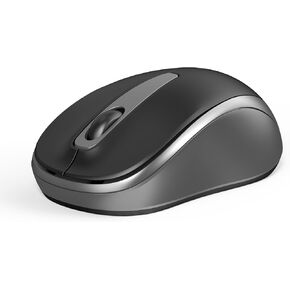 الماوس اللاسلكي ، الماوس الصغير الصامت الصغير مع USB ، 2400 نقطة في البور
KWD 4.500
الماوس اللاسلكي ، الماوس الصغير الصامت الصغير مع USB ، 2400 نقطة في البور
KWD 4.500
 الفأر القوس بلوتوث - الماوس القابل للطي المحمول بدون مستقبل USB ، فئران قابلة للطي مناسبة للكمبيوتر المحمول ، الكمبيوتر اللوحي - الأسود
KWD 4.500
الفأر القوس بلوتوث - الماوس القابل للطي المحمول بدون مستقبل USB ، فئران قابلة للطي مناسبة للكمبيوتر المحمول ، الكمبيوتر اللوحي - الأسود
KWD 4.500
 -14%
ASUS ROG KERIS II Origin Mouse Wireless Gaming Mouse-Enrgonomic اليمنى ، 65 جرام ، اتصال ثلاثي الوضع ، 42 كيلو دبيلة ، بطارية تصل إلى 127 ساعة ، والتكوين المستند إلى الويب ، ودعم MAC/MAC
KWD 53
-14%
ASUS ROG KERIS II Origin Mouse Wireless Gaming Mouse-Enrgonomic اليمنى ، 65 جرام ، اتصال ثلاثي الوضع ، 42 كيلو دبيلة ، بطارية تصل إلى 127 ساعة ، والتكوين المستند إلى الويب ، ودعم MAC/MAC
KWD 53




