- التسوق ، اصبح سهلا.
- /
- احصل على التطبيق!
1. Large chassis/small chassis can be used.
2. Support IDE/AHCI programming interface.
3. Compliant with serial version 3.0; Complies with PCI -E 2.0 specification.
4. Full bandwidth transmission speed of 6Gbps.
5. Plug and Play, supports hot plugging.
Specification:
Features:
1. Support IDE/AHCI programming interface.
2. Compliant with serial version 3.0; Complies with PCI-E 2.0 specification.
3. Full bandwidth transmission speed of 6Gbps.
5. Large chassis/small chassis can be used.
Budget:
Master Chip: ASM1061
Product interface: 2 x interface
Applicable slots: PCI-E (1x 4x 8x 16x)
Support: to /7/8/10/11 (32/64 bit)
Package weight: 80g
Packing List:
1 x PCI-E to 3.0 extension card
1 x bracket
1 x CD
Question: What caused the computer to crash and blue screen after installing the Asmedia driver program?
Solution: The blue screen has nothing to do with the hardware. The and driver may cause this problem, please download the driver again.
Note:
1: The fastest adapter card above PCI-e2.0 is 370-400m/s, and the fastest is 120-170m/s on PCI-E1.0.
2: Please confirm whether the adapter card supports PCI-e2.0 or higher when purchasing (old motherboard usually supports 16x).
How to use:
PCIe card to adapter can be used as follows:
(1). Connection conditions and solutions between the disk and the PCIe card for adaptation:
1. The interface mode of PCIe is AHCI mode. If you want to insert the disk into our card, the premise is that the disk must be installed in AHCI mode when installing the into the motherboard, otherwise the disk cannot be booted through our card transfer card.
2, if it is determined that the disk is inserted into the main board installation interface is AHCI mode, you can directly insert the hard disk into our card, and then enter the BIOS of the main board to set the disk as the first boot in the line.
3, the above two conditions are met, if they still cannot start, or repeated reboot, then it may be the motherboard hard disk interface and our adapter card conflict, the solution is to enter the motherboard BIOS, the motherboard hard disk interface option is set to disable, save the reboot can start the
(2). Connection conditions and solutions for common and PCIe disks for:
1. When the disk is inserted into the motherboard and the common disk is inserted into the PCIe card, the information of the conversion card and the common disk model should be detected during startup.
2, if is set, or cannot boot, then to enter the motherboard BIOS, the disk can be set as the first boot.
(3). Connect disks and common disks to PCIe and solutions:
1, the premise,
Packing List:
1 x PCI-E to 3.0 extension card
1 x bracket
1 x CD
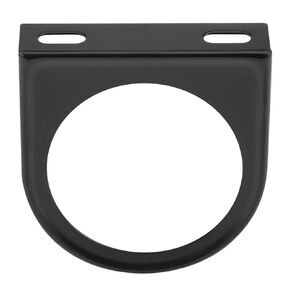 2 بوصة مقياس مقياس أوتومتر مقياس 2 '' 52 مم أسود واحد ثقب المتر متر داش الحامل
KWD 3.500
2 بوصة مقياس مقياس أوتومتر مقياس 2 '' 52 مم أسود واحد ثقب المتر متر داش الحامل
KWD 3.500
 عدسة عدسة عدسة الظل حامي الكاميرا ل EF 28-135mm f/3.5-5.6 هو USM مع تصميم الإثبات الضوء يحسن جودة الصورة يمنع الضوء المبعثر
KWD 5
عدسة عدسة عدسة الظل حامي الكاميرا ل EF 28-135mm f/3.5-5.6 هو USM مع تصميم الإثبات الضوء يحسن جودة الصورة يمنع الضوء المبعثر
KWD 5
 غطاء محرك السيارة المزخرف بفتحة تهوية مغرفة مع تصميم ذاتي اللصق لتعزيز جماليات السيارة (أسود)
KWD 15.500
غطاء محرك السيارة المزخرف بفتحة تهوية مغرفة مع تصميم ذاتي اللصق لتعزيز جماليات السيارة (أسود)
KWD 15.500
 مجموعة طوق مانع للتسرب مقاس 70-200 مم F4/F4L ES USM، ملحق مناسب لتثبيت وموازنة عدسات التلفزيون
KWD 5
مجموعة طوق مانع للتسرب مقاس 70-200 مم F4/F4L ES USM، ملحق مناسب لتثبيت وموازنة عدسات التلفزيون
KWD 5




