- التسوق ، اصبح سهلا.
- /
- احصل على التطبيق!
How to connect keyboard Bluetooth:
1. Full Charge and turn ON the keyboard.
2. Press "Connect" Button to turn on the Bluetooth of the keyboard.
3. Go to your iPad Bluetooth setting, look for "Bluetooth Keyboard" via your iPad Bluetooth function and connect it.
★★★★★Support auto sleep/ wake function
iPad 11th/10th generation 10.9 inch case with keyboard has auto sleep/wake function, protects and conserves the iPad life. iPad will wake up when the case is opened and will go to sleep when it is closed.To achieve the perfect effect of sleep wake-up, please remove the Wireless BT Keyboard, because the keyboard with iron will prevent the mutual attraction between the magnets.
★★★★★Protection from bumps scratches and spills
360° full protection against, Slim Folio carefully envelopes your iPad for all-around protection against bumps scratches and spills On the inside a lightweight frame and keyboard module provide structural integrity .
★★★★★All-around Protection Case
Precise cut-outs and High-quality smart keyboard case iPad 10th gen with full access to all of the ports and features,which provides full protection to keep your iPad free from scratches, dust, wear and tear.
★★★★★Stylus Pen Holder
Built-in stylus pen slot, prevent your stylus pen from being rolling and lost.
★★★★★Magnetic Detachable Keyboard
Detachable Bluetooth keyboard with magnetic case that transforms your iPad into a laptop in less than a second; Built-in rechargeable battery for a long keyboard life and continuous use.
★★★★★Screen Protector Tempered Glass
High Transparency: 99.99% transparency preserves the original screen brightness. You can enjoy a great viewing experience with more brightness and less glare.
Sensitive-touch: Highly sensitive touching performance maintains the original response sensitivity, which ensures quick and accurate typing, smooth games and video playing.
 حافظة لوحة المفاتيح Nanhent مع واقي شاشة لجهاز iPad 10.2 بوصة الجيل التاسع / الجيل الثامن / الجيل السابع، حامل قلم رصاص مدمج غطاء لوحة مفاتيح لاسلكية مغناطيسي قابل للفصل مع زجاج مقسى (أخضر)
KWD 11.500
حافظة لوحة المفاتيح Nanhent مع واقي شاشة لجهاز iPad 10.2 بوصة الجيل التاسع / الجيل الثامن / الجيل السابع، حامل قلم رصاص مدمج غطاء لوحة مفاتيح لاسلكية مغناطيسي قابل للفصل مع زجاج مقسى (أخضر)
KWD 11.500
 حافظة لوحة المفاتيح Nanhent لجهاز Lenovo Tab M9 2023 Release 9.0 بوصة (TB-310FU/TB-310XU)، غطاء حامل نحيف من البولي يوريثان مع لوحة مفاتيح بلوتوث لاسلكية قابلة للفصل مغناطيسيًا (Tab M9 2023 9 بوصات)
KWD 12.500
حافظة لوحة المفاتيح Nanhent لجهاز Lenovo Tab M9 2023 Release 9.0 بوصة (TB-310FU/TB-310XU)، غطاء حامل نحيف من البولي يوريثان مع لوحة مفاتيح بلوتوث لاسلكية قابلة للفصل مغناطيسيًا (Tab M9 2023 9 بوصات)
KWD 12.500
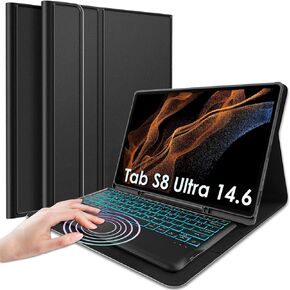 نانهنت حافظة كيبورد بلوحة لمس خلفية لجهاز سامسونج جالكسي تاب S8 الترا 2022 14.6 انش، كيبورد لوحة تحكم باللمس لاسلكية قابلة للفصل بـ7 الوان، غطاء رفيع من البولي يوريثين مع حامل قلم S
KWD 16.500
نانهنت حافظة كيبورد بلوحة لمس خلفية لجهاز سامسونج جالكسي تاب S8 الترا 2022 14.6 انش، كيبورد لوحة تحكم باللمس لاسلكية قابلة للفصل بـ7 الوان، غطاء رفيع من البولي يوريثين مع حامل قلم S
KWD 16.500
 حافظة لوحة مفاتيح لوحة اللمس بإضاءة خلفية من Nanhent لهاتف Samsung Galaxy Tab S9 Ultra 2023/S8 Ultra 2022 14.6 بوصة SM-X910/X916B/X918U/X900/X906، لوحة مفاتيح بلوتوث قابلة للفصل وغطاء نحيف مع حامل قلم S
KWD 11
حافظة لوحة مفاتيح لوحة اللمس بإضاءة خلفية من Nanhent لهاتف Samsung Galaxy Tab S9 Ultra 2023/S8 Ultra 2022 14.6 بوصة SM-X910/X916B/X918U/X900/X906، لوحة مفاتيح بلوتوث قابلة للفصل وغطاء نحيف مع حامل قلم S
KWD 11




