- التسوق ، اصبح سهلا.
- /
- احصل على التطبيق!
The charging cable is compatible with Playstation 5/ Compatible with Xbox Series X/S controller /Switch Pro controller /Switch Console. Coming with 2 pack replacement Type-C Ports charging cable. If the cable can't charge after connecting the controller, please plug in the charging cable in reverse. (Important Note: 1:Please use front usb port for the PS5 console to achieve the fastest charging, the back usb port will cause your charging speed to be very slow. 2:Please use 5V/2A above power adapter)
The cooling fan is dual mode. The built-in smart chip can auto sense the temperature and adjust the fan speed; Auto Mode: defaults to Auto Mode after powering on, the indicator light shows green (After 5 seconds of mediumair speed, it automatically determines whether the fan is working or not, and selects the fan speed according to the temperature of the air outlet, and has 3 fan speeds ). If the fan no work,the RGB light will also go out, you can turn on the RGB light again by the light switch alone. Adjustment by touching the switch. When you touch the switch,the automatic fan speed changes to the manual medium fan speed and the indicator light shows blue; Touch again to change the fan speed to manual high fan speed and the indicator light shows orange; Touch again to turn off the fan, the indicator light turns off or long press for 3 seconds to turn off the fan.
 -32%
محطة شحن مروحة تبريد RGB مطورة لوحدة التحكم ووحدة التحكم Xbox Series X، وقاعدة شاحن لاسلكي مزدوج ونظام تبريد مع 15 وضع إضاءة ملون لـ Xbox Series X وتخزين الملحقات
KWD 14
-32%
محطة شحن مروحة تبريد RGB مطورة لوحدة التحكم ووحدة التحكم Xbox Series X، وقاعدة شاحن لاسلكي مزدوج ونظام تبريد مع 15 وضع إضاءة ملون لـ Xbox Series X وتخزين الملحقات
KWD 14
 -35%
مروحة تبريد مقاومة للغبار لوحدة تحكم Xbox Series X مع شريط إضاءة ملون، فلتر غطاء غبار MENEEA، سدادات غبار مطاطية، مروحة علوية منخفضة الضوضاء مع 3 تروس، مفتاح لمس مستقل للتبريد والضوء، 2 منفذ USB
KWD 12
-35%
مروحة تبريد مقاومة للغبار لوحدة تحكم Xbox Series X مع شريط إضاءة ملون، فلتر غطاء غبار MENEEA، سدادات غبار مطاطية، مروحة علوية منخفضة الضوضاء مع 3 تروس، مفتاح لمس مستقل للتبريد والضوء، 2 منفذ USB
KWD 12
 حامل تبريد لجهاز Xbox Series S مع محطة شحن وإضاءة RGB، ومروحة منخفضة الضوضاء من MENEEA لوحدة التحكم وشاحن سريع لوحدة التحكم، وملحقات مع بطاريتين قابلتين لإعادة الشحن بقدرة 1400 مللي أمبير في الساعة، وخطاف سماعة الرأس
KWD 11
حامل تبريد لجهاز Xbox Series S مع محطة شحن وإضاءة RGB، ومروحة منخفضة الضوضاء من MENEEA لوحدة التحكم وشاحن سريع لوحدة التحكم، وملحقات مع بطاريتين قابلتين لإعادة الشحن بقدرة 1400 مللي أمبير في الساعة، وخطاف سماعة الرأس
KWD 11
 -23%
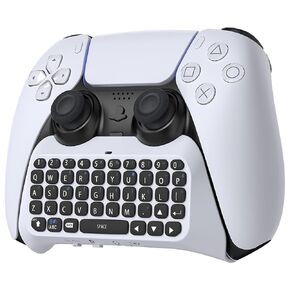
لوحة مفاتيح تحكم لاسلكية لبلاي ستيشن 5، لوحة تشاتبورد المحمولة بتقنية البلوتوث 3.0 مع مكبر صوت مدمج ومقبس صوت 3.5 مم للوحة دردشة صوتية بلاي ستيشن 5 من أجل الرسائل والدردشة المباشرة للألعاب
KWD 8.500
-23%
لوحة مفاتيح تحكم لاسلكية لبلاي ستيشن 5، لوحة تشاتبورد المحمولة بتقنية البلوتوث 3.0 مع مكبر صوت مدمج ومقبس صوت 3.5 مم للوحة دردشة صوتية بلاي ستيشن 5 من أجل الرسائل والدردشة المباشرة للألعاب
KWD 8.500




