- Shopping, made easy.
- /
- Get the app!
Recommended Product Description for Your Amazon Listing Before First Use - Please Read to Ensure Optimal Performance: To ensure your GPS navigator works perfectly right out of the box, please follow these essential setup steps. Most issues are resolved by correct initial configuration. 🔧 Step 1: Initial Setup & Charging FULLY CHARGE the device using the INCLUDED CAR CHARGER before first use. Charge in the car AFTER the engine has started to protect the device from power surges. 🚗 Step 2: Set Your VEHICLE Profile (CRITICAL for Accurate Routes!) The device defaults to "Truck" mode. If you are driving a car, you MUST change this setting to get efficient routes. Go to: Navigation → Settings (Tool Icon) → Route Settings → Vehicle Select your vehicle type: Car, Truck, RV, Bus, etc. For Trucks/RVs: You MUST input your vehicle's Exact Height, Width, Weight, and Length to avoid roads with restrictions. Save this as your default profile. 🛰️ Step 3: Find a GPS Signal for the First Time For your FIRST USE, please go to an OPEN OUTDOOR AREA away from tall buildings. The initial satellite signal search can take up to 20-30 minutes. Subsequent starts will be much faster. ⏰ Step 4: Set the Correct TIME ZONE An incorrect time zone can cause display issues. Go to: Main Menu → Settings → Date & Time to set the local time. We recommend DISABLING "Auto Time Zone" in the navigation settings (Navigation → Settings → Regional → Time Zone) for a stable time display. 🧭 Step 5: Choose Your Route Preference Customize how the GPS plans your journey: Go to: Navigation → Settings → Route Settings → Route Planning Method Choose from: Fast / Green (Eco) / Short / Easy. Need More Help? Your device includes a detailed User Manual with full instructions for all features, including FM Transmitter setup, voice guidance languages, and more. Please refer to it for a complete guide. 【Universal & Smart Routing for All Vehicles】: This GPS is universally compatible with any vehicle. For Trucks & RVs: To activate safe, custom routes that avoid low bridges and narrow roads, you must enter your vehicle's exact size and weight in Settings → Route Settings → Vehicle Profile after purchase.
 Wireles Remote Control for Alpine IXA-W404 IXA-W407 CDESXM145BT CDEW235BT CDM7829 CDM7857 CDM7861 CDE-131R CDE-123R CDE-9882RSi BT Bluetooeh CD Car Stereo Receiver System
KWD 7
Wireles Remote Control for Alpine IXA-W404 IXA-W407 CDESXM145BT CDEW235BT CDM7829 CDM7857 CDM7861 CDE-131R CDE-123R CDE-9882RSi BT Bluetooeh CD Car Stereo Receiver System
KWD 7
 -12%
Soundstream VRCPAA-106F VRCPAA-106F 10.6-Inch Double-DIN DVD Head Unit with Bluetooth, Apple CarPlay/Android Auto, and Floating Touch Screen
KWD 53.500
-12%
Soundstream VRCPAA-106F VRCPAA-106F 10.6-Inch Double-DIN DVD Head Unit with Bluetooth, Apple CarPlay/Android Auto, and Floating Touch Screen
KWD 53.500
 Car Front View Camera Switcher, Smart Car Parking Camera Converter Front Rear View Video Switch Channel Control Box
KWD 11
Car Front View Camera Switcher, Smart Car Parking Camera Converter Front Rear View Video Switch Channel Control Box
KWD 11
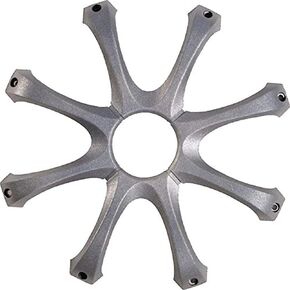 Kicker GR120 12 Inch Speaker Grille
KWD 6.500
Kicker GR120 12 Inch Speaker Grille
KWD 6.500




