- التسوق ، اصبح سهلا.
- /
- احصل على التطبيق!
Lamp model:ELPLP92/V13H010L92
Wattage: 300W
Lamp Life:3000-4000 Hours
Warranty time: 180 Days
TYPE: 1*new replacement projector Lamp bulb with housing
COMPATIBLE MODULES(Ctrl+F to find your model) : For Epson BrightLink 696Ui BrightLink 697Ui BrightLink 698 BrightLink Pro 1440Ui BrightLink Pro 1450Ui BrightLink Pro 1460Ui EB-1440UI EB-1450UI EB-1460UI EB-14x EB-696UI EB-69x Projectors ;
If you're not sure whether it's compatible with your projector, or if you have any problems when using it, you can send us an email or leave a QA. Our after-sales team will help you.
9 steps to replace the projector lamp
1.Gather the necessary tools, screwdriver.
2.Turn off TV or Projector.
3.Remove Lamp Compartment Door.
4.Remove Lamp Assembly. Carefully pull out the lamp assembly and disconnect any power cords that may still be connected to the lamp assembly. Put it aside and don't get it confused with your new lamp!
5.Clean Lamp Compartment. Dust gets everywhere and while you have the projector open, use a soft cloth or micro-fiber cleaning cloth to remove any loose dust from the lamp compartment.
6.Insert New Lamp Assembly. Carefully reconnect any power cables to the new lamp if present and slide the new lamp into the compartment in the same orientation that the original lamp came out.
7.Replace Lamp Compartment Door. Set the lamp compartment door back into place and securely screw in the door without screwing it in too tightly.
8.Reset the lamp timer. Instructions on how to do this should be covered by the instruction manual.
9.You're Done! Enjoy your projector or TV again and make sure you have a backup lamp handy in case the lights go out unexpectedly.
 استبدال جهاز التحكم عن بعد للتلفزيون/الصوت/جهاز العرض للمسرح المنزلي باناسونيك SA-PT70 SA-PT75 SA-PT85 SA-XH150 SA-PT480
KWD 18
استبدال جهاز التحكم عن بعد للتلفزيون/الصوت/جهاز العرض للمسرح المنزلي باناسونيك SA-PT70 SA-PT75 SA-PT85 SA-XH150 SA-PT480
KWD 18
 10 أزواج من النظارات الورقية ثلاثية الأبعاد من هوني، عدسات حمراء وسماوية في إطار أبيض من الورق المقوى النقش للأفلام والمجلات والكتب ثلاثية الأبعاد، مطوية
KWD 3
10 أزواج من النظارات الورقية ثلاثية الأبعاد من هوني، عدسات حمراء وسماوية في إطار أبيض من الورق المقوى النقش للأفلام والمجلات والكتب ثلاثية الأبعاد، مطوية
KWD 3
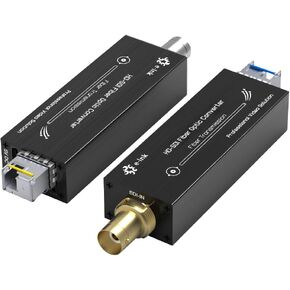 موسع ألياف HD SDI صغير 1080P & 30HZ HD-SDI عبر محول الألياف مستوى البث SDI جهاز إرسال واستقبال بصري للفيديو أحادي الوضع من الألياف المفردة 20 كجم
KWD 33
موسع ألياف HD SDI صغير 1080P & 30HZ HD-SDI عبر محول الألياف مستوى البث SDI جهاز إرسال واستقبال بصري للفيديو أحادي الوضع من الألياف المفردة 20 كجم
KWD 33
 -13%
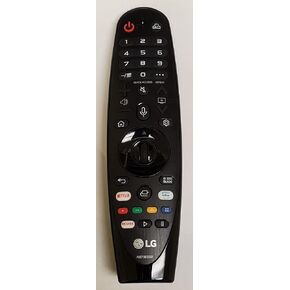
جهاز التحكم عن بعد السحري الأصلي MR20GA LG AKB75855501 مع صوت ومؤشر عالمي أيضًا لـ mr18ba وmr19ba
KWD 7
-13%
جهاز التحكم عن بعد السحري الأصلي MR20GA LG AKB75855501 مع صوت ومؤشر عالمي أيضًا لـ mr18ba وmr19ba
KWD 7




