- التسوق ، اصبح سهلا.
- /
- احصل على التطبيق!

Product Features Backlight
1. The default 20 backlight patterns switch by press [FN] + [R_SHIFT] to cycling switch the light patterns.
2. Press [FN] + [←/→] to adjust light rotating speed, total 6 levels. Press [FN] + [ ↑ / ↓ ] to adjust backlight brightness, total 6 levels.
3. Backlight color switching: [FN] + [ENTER] to cycling switch Red, Green, Blue, Yellow, Purple, Cyan, White, RGB.
4. Backlight DIY: Press [FN] + [Back space] to enter DIY mode,[ESC] [A] [S] [W] [D] [ ↑ ] [ ↓ ] [←] [→] lights on by default, Press [FN] + [Back space] again to start recording,"CAPS" LED will flashing till the recording completed, Continuously press the key to select the color you want to set, once key light color setting are completed, press [FN] + [Back space] to save.
How to connect the keyboard with multi-ple devices
Wired Connection
1.2.4G/OFF/BT switch on "OFF".
2.Connect the keyboard to computer with USB cable.
3.The computer will recognize and configure the keyboard automatically.
2.4G Wireless Connection
1.2.4G/OFF/BT switch on "2.4G".
2.Press and hold [FN]+[4]for 3 seconds,the LED flashes quickly in white,plug the USB receiver into USB port on your computer,after paired the LED will turn to white steady on.
Bluetooth Connection
1.2.4G/OFF/BT switch on"BT".
2.Press and hold [FN]+[1/2/3]for 3 seconds, Indicator flashes in Blue[1]or Red[2] or Green[3] quickly.
3.Turn on Bluetooth function and searching for available devices,It will find "BT5.2_1 or BT5.2_2 or BT5.2_3"device. Select a Bluetooth name to pair,after paired the LED will turn to steady on.
4.To switch the Bluetooth connections between BT1/BT2/BT3,press FN+1/2/3.
 -15%
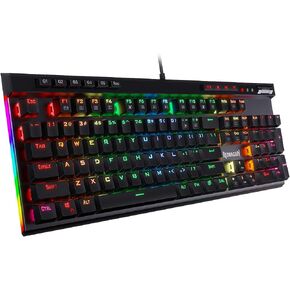
لوحة مفاتيح ميكانيكية للألعاب Redragon K580 VATA RGB LED بإضاءة خلفية مع مفاتيح ماكرو وعناصر تحكم مخصصة للوسائط، وتسجيل ماكرو على اللوحة (مفاتيح زرقاء)
KWD 22.500
-15%
لوحة مفاتيح ميكانيكية للألعاب Redragon K580 VATA RGB LED بإضاءة خلفية مع مفاتيح ماكرو وعناصر تحكم مخصصة للوسائط، وتسجيل ماكرو على اللوحة (مفاتيح زرقاء)
KWD 22.500
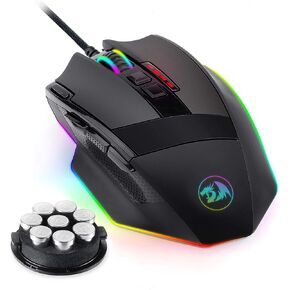 ماوس الألعاب Redragon M801 LED RGB بإضاءة خلفية MMO 9 أزرار ماوس قابلة للبرمجة مع أزرار جانبية لتسجيل الماكرو وزر إطلاق نار سريع 16000 نقطة في البوصة لألعاب الكمبيوتر الشخصي التي تعمل بنظام Windows (لاسلكي، أسود)
KWD 12.500
ماوس الألعاب Redragon M801 LED RGB بإضاءة خلفية MMO 9 أزرار ماوس قابلة للبرمجة مع أزرار جانبية لتسجيل الماكرو وزر إطلاق نار سريع 16000 نقطة في البوصة لألعاب الكمبيوتر الشخصي التي تعمل بنظام Windows (لاسلكي، أسود)
KWD 12.500
 لوحة مفاتيح ميكانيكية Redragon K619 Horus RGB، لوحة مفاتيح سلكية للألعاب مصممة رفيعة للغاية مع أغطية مفاتيح منخفضة المستوى، تحكم مخصص في الوسائط ومفاتيح بنية تعمل باللمس، دعم البرامج الاحترافية
KWD 29
لوحة مفاتيح ميكانيكية Redragon K619 Horus RGB، لوحة مفاتيح سلكية للألعاب مصممة رفيعة للغاية مع أغطية مفاتيح منخفضة المستوى، تحكم مخصص في الوسائط ومفاتيح بنية تعمل باللمس، دعم البرامج الاحترافية
KWD 29
 -19%
لوحة مفاتيح الألعاب الميكانيكية Redragon K585 DITI بيد واحدة RGB الميكانيكية، لوحة مفاتيح ألعاب احترافية من النوع C مع 7 مفاتيح ماكرو مدمجة، مسند معصم قابل للفصل، 42 مفتاحًا (مفتاح أسود وأزرق)
KWD 12.500
-19%
لوحة مفاتيح الألعاب الميكانيكية Redragon K585 DITI بيد واحدة RGB الميكانيكية، لوحة مفاتيح ألعاب احترافية من النوع C مع 7 مفاتيح ماكرو مدمجة، مسند معصم قابل للفصل، 42 مفتاحًا (مفتاح أسود وأزرق)
KWD 12.500

