- التسوق ، اصبح سهلا.
- /
- احصل على التطبيق!
X99 B9 Motherboard Specification:
Motherboard Model: JUXIESHI X99-B9
Compatible Processor: Support Intel Xeon E5-XXXX-V4, Xeon E5-XXXX-V3, and Intel Core i7 6950X/6900K/6850K/6800K/5960X/5930K/5820K, etc. series CPU on LGA 2011-3 Socket
Chipset: Intel C612 chipset
CPU Socket: LGA 2011-3
RAM Memory Technology: 4 x DDR4 DIMM memory slots,support maximum memory 128GB (32GB*4)
Memory Description: Support DDR4 2133/2400MHz, the actual memory frequency support depends on the processor type
Quad channel memory architecture; Desktop memory, non-ECC, ECC, and RECC memory
Compatible Devices: Personal Computer, Keyboard, Mouse, Printer, Projector,Microphone, Monitor, Video Card, etc.
Platform: Windows 8, Windows 10, Windows 11, Linux
Power Supply: The intel DDR4 mother board adopts 8-phase power supply
Quick Boot Key: F11 - Turn x99 m-atx motherboard on, and press the F11 key continuously.
Enter BIOS: Turn the server motherboard on, and press the main "DEL" key continuously.
Size: 245*190*35 mm
Form Factor: mATX
BIOS Function:
Diskless Boot: Support
Above 4G Decoding: Support
Wake On LAN (WOL): Support
Hibernation: Does not support
Virtualisation (VT-D): Support
Re-Size BAR Decoding: Support
Restore AC Power Loss: Support
RAID: Support RAID0, RAID1, RAID5
Boot without Graphics Card: Support
Memory Timing Modification (XMP): Does not support
CPU Fan Speed Modification: Support CPU_FAN1 interface only
Expansion Slot:
1 x PCIe 3.0 x16 slot
1 x PCIe 2.0 x4 slot
1 x PCIe 2.0 x1 slot
Storage Device Slot:
Support 6 x SATA 6Gb/s ports and 2 x M.2 slots,
Dual M.2 slots type 2242/2260/2280/22110 (supports PCIe 3.0 x4 & SATA modes)
Applicable Hard Disk: Supports 2.5-inch SATA SSD, 3.5-inch HDD, MVMe M.2 SSD, SATA M.2 SSD.
LAN Connectivity and Audio:
Realtek 8111H Gigabit LAN controller
Realtek ALC897 High Definition Audio CODEC
USB Port:
5 x USB 3.0 port(s), 5 x USB 2.0 port(s) (8 at back panel, 2 at mid-board)
Back I/O Port:
2 x PS/2 keyboard/mouse port(s)
1 x LAN(RJ45) port(s)
4 x USB 3.0 (blue)
4 x USB 2.0
3 x Audio jack(s)
Internal I/O Port:/b>
1 x USB 3.0 connector,
1 x USB 2.0 connector,
2 x M.2 slots (SATA/NVMe Protocol)
1 x SATA/NVMe M.2 Mode jumper
6 x SATA 6 Gb/s connectors,
1 x 4-pin PWM CPU Fan header
1 x 4-pin Chassis Fan header
1 x 3-pin Chassis Fan header
1 x Front Panel Audio header
1 x 24-pin EATX Power connector
1 x 8-pin ATX 12V Power connector
1 x Front Panel connector,
1 x 2-pin Clear CMOS header
1 x AUTO_ON header
1 x COM Port header
1 x Buzzer
JUXIESHI Protection:
JUXIESHI Electro-Static Discharge
JUXIESHI Overvoltage Protection
JUXIESHI Overcurrent Protection
JUXIESHI Thermal Solution
Power Chipset Aluminum Heatsink
Chipset Aluminum Heatsink
One 4-pin PWM CPU Fan Header
CPU and System Fan:
CPU_FAN1: Support intelligent temperature control, when CPU temperature is high, fan speed is fast, CPU temperature is low, fan speed is low.
SYS_FAN1: Does not support temperature control, the fan will run at full speed;
SYS_FAN2: Does not support temperature control, the fan will run at full speed;
J_AUTO_ON1 Jumper Cap:
It's Restore AC Power Loss jumper caps, default is OFF.
If move the jumper cap to the right two pin for the "ON" state, when the motherboard is powered on, the motherboard will automatically boot.
How to Clear CMOS:
Power off remove all parts, and use tweezers or other metal conductive objects, short 2-pin header (JCMOS1) for 3-5 seconds.
Packing List:
JUXIESHI X99 B9 Motherboard *1
CPU Cooling Fan Bracket *1
SATA Cable *1
I/O Shield *1
 -15%
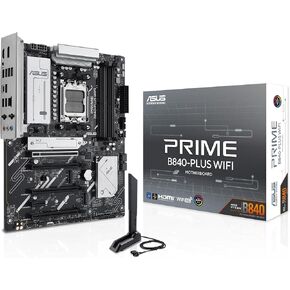
Asus Prime B840-Plus WiFi AMD AM5 B840 ATX Motherboard ، Advanced AI Ready ، DDR5 ، PCIe 4.0 ، 3x M.2 ، Wi-Fi 6E ، 2.5GB LAN ، DisplayPort ، HDMI ™ ، USB 10GBPS Type-A & type-C® ، BIOS Flashback ™ ، Aura Sync RGB
KWD 64
-15%
Asus Prime B840-Plus WiFi AMD AM5 B840 ATX Motherboard ، Advanced AI Ready ، DDR5 ، PCIe 4.0 ، 3x M.2 ، Wi-Fi 6E ، 2.5GB LAN ، DisplayPort ، HDMI ™ ، USB 10GBPS Type-A & type-C® ، BIOS Flashback ™ ، Aura Sync RGB
KWD 64
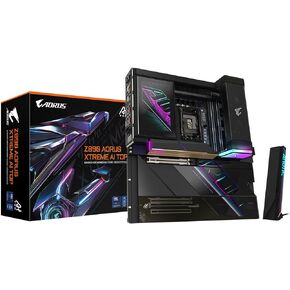 Gigabyte Z890 Aorus Xtreme AI Top Intel Core Ultra (Series 2) LGA 1851 Motherboard ، E-ATX ، DDR5 ، 4X M.2 ، PCIe 5.0 ، Thunderbolt 5 ، WiFi7 ، 10GBE LAN ، EZ-LATCH
KWD 247
Gigabyte Z890 Aorus Xtreme AI Top Intel Core Ultra (Series 2) LGA 1851 Motherboard ، E-ATX ، DDR5 ، 4X M.2 ، PCIe 5.0 ، Thunderbolt 5 ، WiFi7 ، 10GBE LAN ، EZ-LATCH
KWD 247
 Rock 5C (Lite) RK3588S2 ، CPU SBC 8-Core ، HDMI مع إخراج 8K ، PCIE 2.1 حارة ، Gigabit Ethernet ، كمبيوتر لوح واحد (Radxa Rock 5C 2GB)
KWD 30
Rock 5C (Lite) RK3588S2 ، CPU SBC 8-Core ، HDMI مع إخراج 8K ، PCIE 2.1 حارة ، Gigabit Ethernet ، كمبيوتر لوح واحد (Radxa Rock 5C 2GB)
KWD 30
 -10%
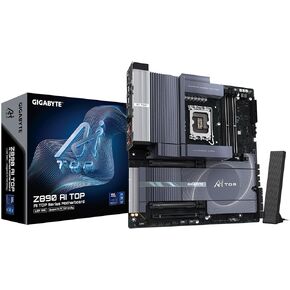
Gigabyte Z890 AI Top Intel Core Ultra (Series 2) LGA 1851 Motherboard ، E-ATX ، DDR5 ، 4X M.2 ، PCIe 5.0 ، Thunderbolt 5 ، WiFi7 ، 10GBE LAN ، EZ-LATCH
KWD 181
-10%
Gigabyte Z890 AI Top Intel Core Ultra (Series 2) LGA 1851 Motherboard ، E-ATX ، DDR5 ، 4X M.2 ، PCIe 5.0 ، Thunderbolt 5 ، WiFi7 ، 10GBE LAN ، EZ-LATCH
KWD 181




