- التسوق ، اصبح سهلا.
- /
- احصل على التطبيق!
XIM ELPLP94/V13H010L94 Projector Lamp & Projector Bulb with housing.
Lamp compatible projector:
fit for Epson PowerLite 1795F EB-1780W EB-178x EB-179x H793A H793B H793C H794A H794B H794C H795A H795B H795C H796A H796B H796C Powerlite 1780W Powerlite 1781W Powerlite 1785W
Please confirm whether the lamp you want to buy is correct before placing an order.
Precautions when using projector lamps:
1.Handle with care.
2.If the ambient temperature is too high, it will automatically turn off the light.
High ambient humidity will reduce the life of the bulb.
3.Do not turn off the projector immediately after turning it on, otherwise it will affect the brightness and lifespan, or even cause the lamp to fail to light up.
4.The projection needs to be cleaned regularly, and the lamp operation and stability should be checked after cleaning is completed.
We can provide:
1. Comparable to the original Bulb/Lamp with Housing.
2. Comparable to the original Bare Bulb.
If necessary, please contact us.
How to change the lamp on your projector:
Step 1. Unplug the power cord from your projector and let the lamp cool down.
Step 2. Locate the lamp access panel on your projector and remove the screws and access panel.
Step 3. Remove any screws holding the lamp housing into the projector.
Step 4. Reach in and firmly pull the lamp housing out of the projector.
Step 5. Place the new lamp housing into the projector in the same orientation as you removed the old lamp.
Step 6. Wiggle the lamp into place and make sure full contact is made inside of the projector.
Step 7. Replace the lamp mounting screws to secure the lamp into the projector.
Step 8. Replace the lamp access panel and secure the screws.
Step 9. Plug in your projector and power it on.
Step 10. Reset the lamp counter. Some lamps will reset the lamp counter automatically when a new lamp is placed in.
If your projector needs the lamp counter manually reset, look through the projector menus for an option to reset the 'Lamp Counter' back to 0 hours.
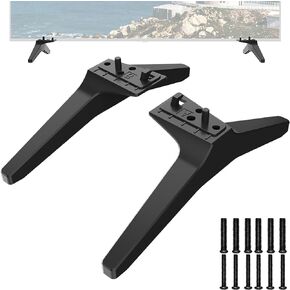 حامل تلفزيون بديل لتلفزيون ال جي، ارجل حامل تلفزيون 60 65 بوصة ال جي 60UJ6050 60UK6090 60UM6900 60UN7300 65UJ6300 65UK6090 65UM6900 65UM6900 65UM7300PUA 65UN66 950 حامل 950قاعدة حامل تلفزيون ال جي مع
KWD 9
حامل تلفزيون بديل لتلفزيون ال جي، ارجل حامل تلفزيون 60 65 بوصة ال جي 60UJ6050 60UK6090 60UM6900 60UN7300 65UJ6300 65UK6090 65UM6900 65UM6900 65UM7300PUA 65UN66 950 حامل 950قاعدة حامل تلفزيون ال جي مع
KWD 9
 تلفزيون - طبق - غطاء طبق الأقمار الصناعية - علم الولايات المتحدة الأمريكية على الطبق الأسود العالمي للطبق المستدير أو البيضاوي - ذا ديش هودي
KWD 24.500
تلفزيون - طبق - غطاء طبق الأقمار الصناعية - علم الولايات المتحدة الأمريكية على الطبق الأسود العالمي للطبق المستدير أو البيضاوي - ذا ديش هودي
KWD 24.500
 XIM ELPLP41/ V13H010L41 مصباح بروجيكتور بديل متوافق مع Epson EMP-S52 S6 X5 X52 X56E X6 EX21 EX30 EX50 EX70 EX90 H281B H283A H283B H283C H284A H284B H285A H285C H330A H330B H330C H371A HC 700
KWD 13.500
XIM ELPLP41/ V13H010L41 مصباح بروجيكتور بديل متوافق مع Epson EMP-S52 S6 X5 X52 X56E X6 EX21 EX30 EX50 EX70 EX90 H281B H283A H283B H283C H284A H284B H285A H285C H330A H330B H330C H371A HC 700
KWD 13.500
 جهاز ارسال واستقبال من مايكرو تيك
KWD 75
جهاز ارسال واستقبال من مايكرو تيك
KWD 75




