- التسوق ، اصبح سهلا.
- /
- احصل على التطبيق!
How to Use:
1. Programming function setting: Long press the SET button for 2 seconds, the corresponding LED of x flashes quickly (4HZ), and then short press the M1 or M2 button, the LED light will flash slowly on the corresponding function silk screen in sequence (the lighting sequence is x, round, triangular, rectangle, R3, L3, R2, L2, R1, L1), and then press the SET key, the corresponding function will be mapped to M1/2; for example: when entering the programming mode, press the M1 key, the LED will display Go to R1, and then press the SET button again, the LED on R1 will turn on, and the function of M1 will be R1; programming M2 is similar to the above. 10 LEDs are used as button function indicators to indicate the function of the programmed button, and a maximum of 2 LED lights are displayed.
2. Cancel function: Long press the SET button for 5 seconds, the programming indicator LED will change from fast flashing to off, then the M1/2 function will be cleared, and the button has no programming function at this time.
3. Program key memory function: insert the back key extender into the handle, if M1/2 has no function, LED1 will flash slowly (2HZ) for 3 seconds and then turn off, long press the SET key to enter the programming mode and LED1 will flash quickly; if M1/2 When the last programming function is memorized, the corresponding LED light will be on for a long time. Power off to save the previous programming function; insert the handle again to retain the last programming function, and the factory default has no programming function.
Specification:
Item Type: Game Controller Paddles
Material: ABS
Applicable Model: for
Sleep Current: Less Than 30?A
Working Current: Less Than 15?A
Package List:
1 x Game Controller Paddles
1 x Manual

 محول عجلة قيادة الألعاب لـ Thrustmaster، محول عجلة قيادة احترافي من الألومنيوم، محول عجلة لـ Thrustmaster T300 T500 TS PC TS XW (أحمر)
KWD 8.500
محول عجلة قيادة الألعاب لـ Thrustmaster، محول عجلة قيادة احترافي من الألومنيوم، محول عجلة لـ Thrustmaster T300 T500 TS PC TS XW (أحمر)
KWD 8.500
![وحدة تحكم عصا التحكم التناظرية ثلاثية الأبعاد من ريترو كلاسيك، مع زر تشغيل وعصا تحكم رباعية الاتجاهات، تحكم في الألعاب لـ 2600، متوافق مع وحدة تحكم 7800، واجهة 9 سنون [لعبة فيديو] in Kuwait](https://cdn1.tilga.com/md/prod/3/1424/3/88847173.38334.jpg) وحدة تحكم عصا التحكم التناظرية ثلاثية الأبعاد من ريترو كلاسيك، مع زر تشغيل وعصا تحكم رباعية الاتجاهات، تحكم في الألعاب لـ 2600، متوافق مع وحدة تحكم 7800، واجهة 9 سنون [لعبة فيديو]
KWD 6.500
وحدة تحكم عصا التحكم التناظرية ثلاثية الأبعاد من ريترو كلاسيك، مع زر تشغيل وعصا تحكم رباعية الاتجاهات، تحكم في الألعاب لـ 2600، متوافق مع وحدة تحكم 7800، واجهة 9 سنون [لعبة فيديو]
KWD 6.500
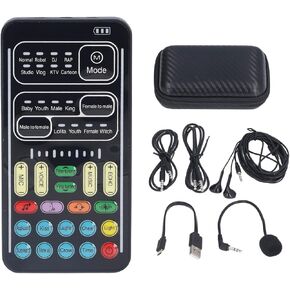 تغيير صوت لعبة البث ، جهاز تغيير صوت Mini Mini مع 8 أصوات مختلفة ، بطاقة صوت الصوت المباشر الصوتية MINI CARD
KWD 10.500
تغيير صوت لعبة البث ، جهاز تغيير صوت Mini Mini مع 8 أصوات مختلفة ، بطاقة صوت الصوت المباشر الصوتية MINI CARD
KWD 10.500
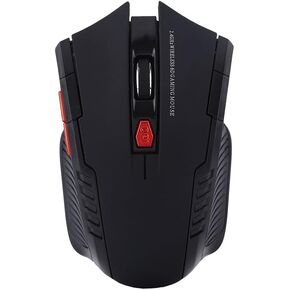 الماوس DPOFIRS ، فأر الكمبيوتر مع 2.4G USB NANO المتلقي ، 800DPI/1200DPI ، الماوس للألعاب لجهاز الكمبيوتر المحمول الكمبيوتر المحمول 2000 Linux 7
KWD 4
الماوس DPOFIRS ، فأر الكمبيوتر مع 2.4G USB NANO المتلقي ، 800DPI/1200DPI ، الماوس للألعاب لجهاز الكمبيوتر المحمول الكمبيوتر المحمول 2000 Linux 7
KWD 4


![مشغلات الزر الخلفي لوحدة التحكم، زر الرجوع للوحة الألعاب مع 10 تعيينات للمفاتيح الوظيفية، ملحقات الألعاب، مجموعات قطع غيار المجاذيف [لعبة فيديو] in Kuwait](https://cdn1.tilga.com/md/prod/3/1376/88070777.26555.jpg)
![مشغلات الزر الخلفي لوحدة التحكم، زر الرجوع للوحة الألعاب مع 10 تعيينات للمفاتيح الوظيفية، ملحقات الألعاب، مجموعات قطع غيار المجاذيف [لعبة فيديو] in Kuwait](https://cdn1.tilga.com/md/prod/3/1376/88070778.38559.jpg)
![مشغلات الزر الخلفي لوحدة التحكم، زر الرجوع للوحة الألعاب مع 10 تعيينات للمفاتيح الوظيفية، ملحقات الألعاب، مجموعات قطع غيار المجاذيف [لعبة فيديو] in Kuwait](https://cdn1.tilga.com/md/prod/3/1376/88070779.22760.jpg)
![مشغلات الزر الخلفي لوحدة التحكم، زر الرجوع للوحة الألعاب مع 10 تعيينات للمفاتيح الوظيفية، ملحقات الألعاب، مجموعات قطع غيار المجاذيف [لعبة فيديو] in Kuwait](https://cdn1.tilga.com/md/prod/3/1376/88070780.21166.jpg)
![مشغلات الزر الخلفي لوحدة التحكم، زر الرجوع للوحة الألعاب مع 10 تعيينات للمفاتيح الوظيفية، ملحقات الألعاب، مجموعات قطع غيار المجاذيف [لعبة فيديو] in Kuwait](https://cdn1.tilga.com/md/prod/3/1376/88070781.11814.jpg)
![مشغلات الزر الخلفي لوحدة التحكم، زر الرجوع للوحة الألعاب مع 10 تعيينات للمفاتيح الوظيفية، ملحقات الألعاب، مجموعات قطع غيار المجاذيف [لعبة فيديو] in Kuwait](https://cdn1.tilga.com/md/prod/3/1376/88070782.62172.jpg)
![مشغلات الزر الخلفي لوحدة التحكم، زر الرجوع للوحة الألعاب مع 10 تعيينات للمفاتيح الوظيفية، ملحقات الألعاب، مجموعات قطع غيار المجاذيف [لعبة فيديو] in Kuwait](https://cdn1.tilga.com/md/prod/3/1376/88070783.2244.jpg)
![مشغلات الزر الخلفي لوحدة التحكم، زر الرجوع للوحة الألعاب مع 10 تعيينات للمفاتيح الوظيفية، ملحقات الألعاب، مجموعات قطع غيار المجاذيف [لعبة فيديو] in Kuwait](https://cdn1.tilga.com/md/prod/3/1376/88070784.7631.jpg)
![مشغلات الزر الخلفي لوحدة التحكم، زر الرجوع للوحة الألعاب مع 10 تعيينات للمفاتيح الوظيفية، ملحقات الألعاب، مجموعات قطع غيار المجاذيف [لعبة فيديو] in Kuwait](https://cdn1.tilga.com/md/prod/3/1376/88070785.18001.jpg)