- التسوق ، اصبح سهلا.
- /
- احصل على التطبيق!
CONNECT MORE with Cable Matters Docking Stations
Wireless Docking Just Got Real
The Cable Matters 60 GHz Wireless Docking Station with WiGig technology offers fast and simple docking to WiGig enabled computers. After the initial pairing, the Dock automatically recognizes and connects to your computer when it is in range. Connect wirelessly to a display with HDMI and four USB Type-A peripheral devices such as a mouse, keyboard, or flash drive.
WiGig is a wireless standard specified by the IEEE 802.ad protocol that operates at the 60 GHz frequency band and offers instant docking for in-room wireless communication. It utilizes beamforming technology to reduce congestion and offers data transfer rates up to 7 Gbps to multiple devices. Utilizing the un-cluttered 60 GHz frequency bank, it is much less susceptible to interference than the common 2.4 or 5 GHz bands.
Technical Specifications
- Host Connection: 60 GHz 802.11ad
- HDMI Video Out: 19-Pin Female
- USB 3.0 Ports: 4 x Type-A Female
- Dock Dimensions (HxDxW): 7.9 x 4.8 x 2.0 Inches
- Power Input / Output: AC 100-240V / DC 12V/3A
- OS Support: Windows 10
Package Contents
1 x 60 GHz Wireless Dock Basic Model
1 x Cradle Stand
1 x AC Power Adapter
1 x User Manual
Warranty
Limited One-Year Warranty and Lifetime Product Support

 كابل ماترز 8 في 1 محور USB4 محمول بسرعة 40 جيجابت في الثانية (قاعدة USB 4) منفذ عرض مزدوج 4K@60 هرتز، منفذ عرض فردي 8K@60 هرتز، 100 وات PD، جيجابت إيثرنت، متوافق مع Thunderbolt 4 لـ XPS، Surface Pro، iPad Pro
KWD 31
كابل ماترز 8 في 1 محور USB4 محمول بسرعة 40 جيجابت في الثانية (قاعدة USB 4) منفذ عرض مزدوج 4K@60 هرتز، منفذ عرض فردي 8K@60 هرتز، 100 وات PD، جيجابت إيثرنت، متوافق مع Thunderbolt 4 لـ XPS، Surface Pro، iPad Pro
KWD 31
![[معتمد من Intel] كابل Matters 16 في 1 40 جيجابت في الثانية Thunderbolt 4 Dock مع فيديو رباعي 4K (2x DisplayPort، 2x HDMI) لنظام التشغيل Windows، Dual 4K (DP أو HDMI) لجهاز MacBook Pro مع M1/M2/M3 Pro، M1/M2 /M3 ماكس، 100 واط PD in Kuwait](https://cdn1.tilga.com/md/prod/2/421/3/49443858.45428.jpg) [معتمد من Intel] كابل Matters 16 في 1 40 جيجابت في الثانية Thunderbolt 4 Dock مع فيديو رباعي 4K (2x DisplayPort، 2x HDMI) لنظام التشغيل Windows، Dual 4K (DP أو HDMI) لجهاز MacBook Pro مع M1/M2/M3 Pro، M1/M2 /M3 ماكس، 100 واط PD
KWD 87
[معتمد من Intel] كابل Matters 16 في 1 40 جيجابت في الثانية Thunderbolt 4 Dock مع فيديو رباعي 4K (2x DisplayPort، 2x HDMI) لنظام التشغيل Windows، Dual 4K (DP أو HDMI) لجهاز MacBook Pro مع M1/M2/M3 Pro، M1/M2 /M3 ماكس، 100 واط PD
KWD 87
 كيبل ماترز موزع USB C ثلاثي الشاشات مع 3 منافذ عرض و100 وات شحن ويندوز - ديسبلاي بورت 1.4 ودي اس سي 1.2 لتمكين 8 كيه و4 كيه 120 هرتز - متوافق مع ويندوز فقط
KWD 27
كيبل ماترز موزع USB C ثلاثي الشاشات مع 3 منافذ عرض و100 وات شحن ويندوز - ديسبلاي بورت 1.4 ودي اس سي 1.2 لتمكين 8 كيه و4 كيه 120 هرتز - متوافق مع ويندوز فقط
KWD 27
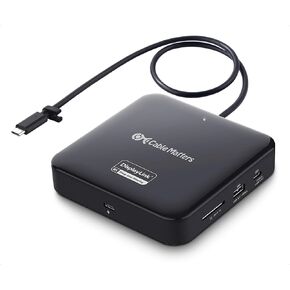 كابل Matters 7 في 1 4K 60 هرتز USB C DisplayLink Dock (محطة إرساء DisplayLink) مع منفذ DisplayPort مزدوج، جيجابت إيثرنت، USB 10 جيجابت في الثانية، قارئ SD، 100 وات PD لأجهزة الكمبيوتر المحمولة MacBook Pro M1 / M2 / M3 وأجهزة الكمبيوتر المحمولة التي تعمل
KWD 45.500
كابل Matters 7 في 1 4K 60 هرتز USB C DisplayLink Dock (محطة إرساء DisplayLink) مع منفذ DisplayPort مزدوج، جيجابت إيثرنت، USB 10 جيجابت في الثانية، قارئ SD، 100 وات PD لأجهزة الكمبيوتر المحمولة MacBook Pro M1 / M2 / M3 وأجهزة الكمبيوتر المحمولة التي تعمل
KWD 45.500


![مسائل الكابلات [معتمدة من Intel] محطة إرساء لاسلكية WiGig Tri Band لأجهزة الكمبيوتر التي تعمل بنظام Windows in Kuwait](https://cdn1.tilga.com/md/prod/3/11848/248985400.43993.jpg)
![مسائل الكابلات [معتمدة من Intel] محطة إرساء لاسلكية WiGig Tri Band لأجهزة الكمبيوتر التي تعمل بنظام Windows in Kuwait](https://cdn1.tilga.com/md/prod/3/11848/248985401.33982.jpg)
![مسائل الكابلات [معتمدة من Intel] محطة إرساء لاسلكية WiGig Tri Band لأجهزة الكمبيوتر التي تعمل بنظام Windows in Kuwait](https://cdn1.tilga.com/md/prod/3/11848/248985402.13955.jpg)
![مسائل الكابلات [معتمدة من Intel] محطة إرساء لاسلكية WiGig Tri Band لأجهزة الكمبيوتر التي تعمل بنظام Windows in Kuwait](https://cdn1.tilga.com/md/prod/3/11848/248985403.52510.jpg)
![مسائل الكابلات [معتمدة من Intel] محطة إرساء لاسلكية WiGig Tri Band لأجهزة الكمبيوتر التي تعمل بنظام Windows in Kuwait](https://cdn1.tilga.com/md/prod/3/11848/248985405.15051.jpg)
![مسائل الكابلات [معتمدة من Intel] محطة إرساء لاسلكية WiGig Tri Band لأجهزة الكمبيوتر التي تعمل بنظام Windows in Kuwait](https://cdn1.tilga.com/md/prod/3/11848/248985407.27632.jpg)
![مسائل الكابلات [معتمدة من Intel] محطة إرساء لاسلكية WiGig Tri Band لأجهزة الكمبيوتر التي تعمل بنظام Windows in Kuwait](https://cdn1.tilga.com/md/prod/3/11848/248985408.44556.jpg)