- التسوق ، اصبح سهلا.
- /
- احصل على التطبيق!
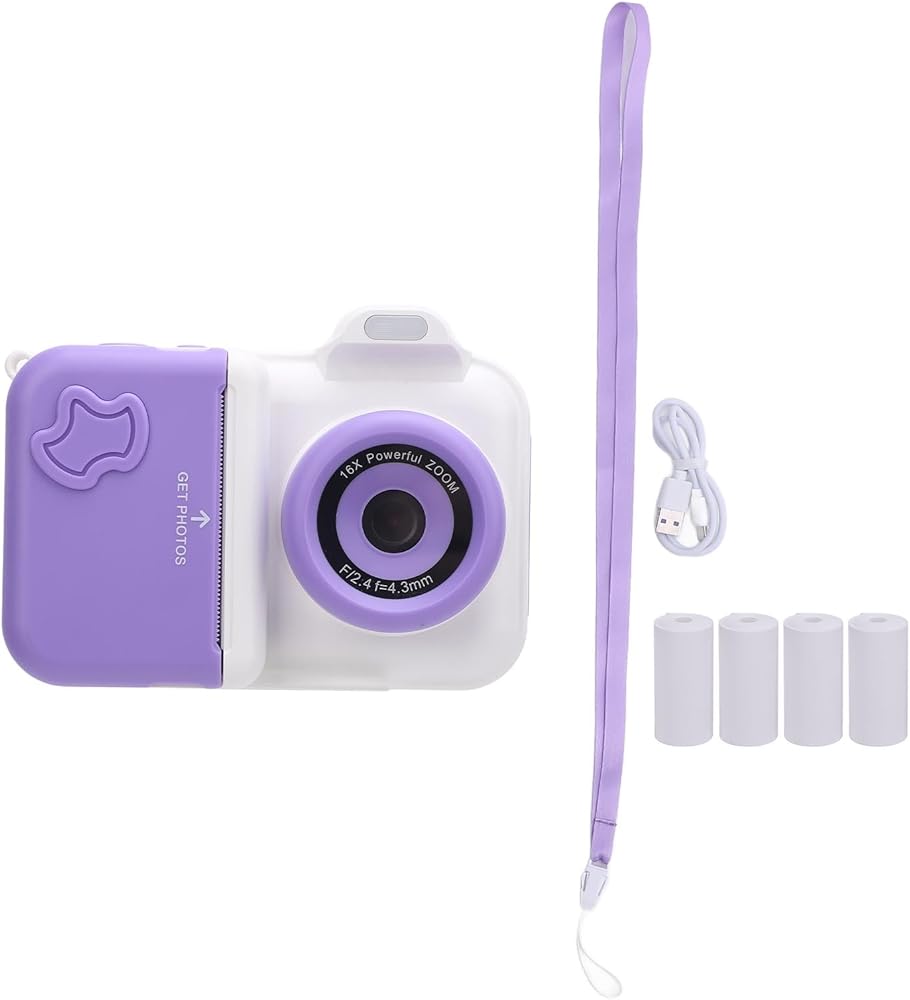
Item Type: Instant Print Camera
Material: ABS
Weight: Approx. 535g / 18.9oz
Storage Media: 32GB Small Memory Card, Ships with Small Memory Card (Installed)
LCD Size: 2.4inch IPS HD Screen
Pixel Range: Front and Rear Camera : 1MP
Battery (Built in) : Li Battery 1300MAH
Function: Photo
Button and Interface Function Introduction:
1. Power button can be turned on off by long press;
2. Shutter Release Button
1) Confirm the key;
2) Tap this button to take photo or video in photo and video mode interface; Long press to switch front and rear lens;
3) Click to play and pause music in music interface;
4) Click to play and pause the video
3. Print Key
1) In the photo interface, click to open and close the print; (in the charging state, can not print)
2) In music interface, click to open and close the music list.
3) In video mode, tap to switch filters;
4) music interface click to switch to the next song
4. Click the Back Button to Return to the Previous Level.
5. Left Click
1) Selection key to left and up;
2) Under the photo interface, click to switch between continuous photography, timing, timing 5 Plus continuous taking, filter, effect, photo frame; long press to zoom focus;
3) Under the video recording interface, short press to switch filters;
4) Music interface click to switch to the previous song.
6. Right Click
1) Right and down selection keys;
2) Under the photo interface, click to switch between continuous photography, timer, timer 5 Plus continuous photography, filter, effect, photo frame; long press to narrow the focus.
7. Album Key, Video or Photo Interface under the Main Interface, Click to Quickly Enter the Album Interface.
8. Menu Key
1) Under photo interface, click to open flash, fill light mode;
2) Under the video recording interface, click to open and close the fill light mode;
3) Under the Album and Music interface, tap to
 عاكس 102 مم التركيز ، 141mm I.D. أنبوب ، طوله 67 مم طول التركيز - التركيز الدقيق الدقيق ، اللامع المضاد للانعكاس ، تلسكوب عاكس DIY متوافق
KWD 13.500
عاكس 102 مم التركيز ، 141mm I.D. أنبوب ، طوله 67 مم طول التركيز - التركيز الدقيق الدقيق ، اللامع المضاد للانعكاس ، تلسكوب عاكس DIY متوافق
KWD 13.500
 أدوات رأس بديلة صعبة ABS ABS متعددة الوظائف Recovery Recover
KWD 26.500
أدوات رأس بديلة صعبة ABS ABS متعددة الوظائف Recovery Recover
KWD 26.500
 عجلة فلتر 1.25 بوصة 5 أوضاع مع محول كاميرا T2 للتلسكوبات - الدقة في التصوير الفلكي، والمواد المضادة للصدأ والتوافق العالمي لمعدات EQ5
KWD 30
عجلة فلتر 1.25 بوصة 5 أوضاع مع محول كاميرا T2 للتلسكوبات - الدقة في التصوير الفلكي، والمواد المضادة للصدأ والتوافق العالمي لمعدات EQ5
KWD 30
 لفة فيلم سلبية ملونة مقاس 35 مم ISO 200، 2 ورقة كل منها 12 ورقة - تأثير عتيق عالي الوضوح، فيلم 35 مم لـ 135 كاميرا وتصوير فوتوغرافي للصور
KWD 11.500
لفة فيلم سلبية ملونة مقاس 35 مم ISO 200، 2 ورقة كل منها 12 ورقة - تأثير عتيق عالي الوضوح، فيلم 35 مم لـ 135 كاميرا وتصوير فوتوغرافي للصور
KWD 11.500

 الكويت