الاجهزه الالكترونيات الامريكية قد تحتاج الى محمول فولت من ١١٠ الى ٢٢٠.قد تحتاج إلى محول كهرباء
مميزات خاصة
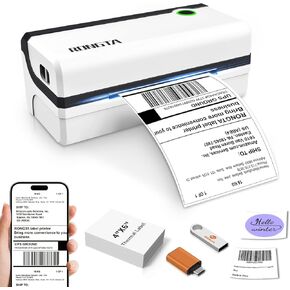
Phone/Tablet Start Print: Step 1: Download APP "RLabel" in google play or ios app store; Step 2: Turn on the RP425 label printer and make a Bluetooth connection in the APP; Step 3: Click the "+" sign to complete the device connection and select the file type to start print
PC Start Print: Step 1:Please download and install the RP425 driver from the Instruction Card; Step 2: Connect with bluetooth or USB cable with your computer; Step 3: Select and open your document, and choose RP4xx in the printer list (For Chrome OS: Achieve seamless Bluetooth pairing through the matching extension)
High-Speed and Easy Set: Easy setup. The package includes Rongta RP425 Printer, User Manual, Instruction Card, Type-C Adapter, you can set up as needed. Print up to 60 labels per minute (127mm/s). Direct thermal technology, no ink or other consumables needed. Easy set and print via "RLabel" app
Automatic Label Detection: Rongta RP425 printer can automatically catch and feed the label and supports label width range from 0.98" to 4.37", it is good for printing shipping and warehouse labels, also suitable for own business
Compatibility: Rongta RP425 printer support IOS/Android phone&tablet. Works with WINXP/WIN7/WIN8/WIN10/WIN11/MAC/Chrome. Compatible with all major shipping and e-commerce platforms inlcuding FedEx, DHL, Amazon, Etsy, eBay, Shopify, etc
Small Size&Portable: RP425 label printer has small size (3.26*2.56*7.08 inch), weight only 1.25lb, portable design is easy to move and save desk space.
Multi Device Connectivity: Rongta RP425 printer can be connected to both computer and mobile phone simultaneously(most 3 device meanwhile). Note: RP425 printer does not support the operation of triggering the print content simultaneously on a computer and a mobile phone, as this would cause data conflicts and confusion. But if they are not printed simultaneously, it won't affect.
 -39%
طابعة ملصقات Rongta، طابعة ملصقات شحن حرارية، طابعة ملصقات شحن 4 × 6 للشركات الصغيرة، متوافقة مع نظام التشغيل Windows وMac (RP420)، 8.66 × 4.13 × 3.54 بوصة
KWD 18
-39%
طابعة ملصقات Rongta، طابعة ملصقات شحن حرارية، طابعة ملصقات شحن 4 × 6 للشركات الصغيرة، متوافقة مع نظام التشغيل Windows وMac (RP420)، 8.66 × 4.13 × 3.54 بوصة
KWD 18
 -43%
طابعة التسمية الحرارية Rongta Bluetooth لحزم الشحن ، وطابعات الملصقات اللاسلكية 4x6 للأعمال التجارية الصغيرة ، ودعم Android ، و iPhone و Windows ، وتستخدم على نطاق واسع في eBay و Amazon و Shopify و Etsy و USPS
KWD 16.500
-43%
طابعة التسمية الحرارية Rongta Bluetooth لحزم الشحن ، وطابعات الملصقات اللاسلكية 4x6 للأعمال التجارية الصغيرة ، ودعم Android ، و iPhone و Windows ، وتستخدم على نطاق واسع في eBay و Amazon و Shopify و Etsy و USPS
KWD 16.500
 Rongta 4x6 Pluetooth Thermal Shipping Label Printer ، Maker Wireless Shipping Label for Amazon FBA ، eBay ، Shopify ، FedEx | متوافق مع Windows/Mac/Android/iOS (أسود)
KWD 20
Rongta 4x6 Pluetooth Thermal Shipping Label Printer ، Maker Wireless Shipping Label for Amazon FBA ، eBay ، Shopify ، FedEx | متوافق مع Windows/Mac/Android/iOS (أسود)
KWD 20
 طابعة إيصالات Rongta POS، طابعة حرارية 80 مم، ESC/POS، طابعة مطبخ للمطاعم مع قاطع آلي يدعم درج النقود، طابعة إيصالات إيثرنت تسلسلية USB للشركات الصغيرة
KWD 37
طابعة إيصالات Rongta POS، طابعة حرارية 80 مم، ESC/POS، طابعة مطبخ للمطاعم مع قاطع آلي يدعم درج النقود، طابعة إيصالات إيثرنت تسلسلية USB للشركات الصغيرة
KWD 37




