موزع USB 3.2 من TSUPY بأربعة منافذ مع كابل ممتد بطول 4 أقدام، محول محول USB 3.2 Gen 2 من الألومنيوم فائق النحافة لنقل البيانات بسرعة وموسع منفذ USB لجهاز MacBook
【5 USB Ports & Aluminium Case Design】:The USB 3.2 splitter easily expand 1 USB Port into 4 high-speed USB 3.2 Ports,one more usb-c charging port ensure large files stable transmission, even high power usb devices using on the hub at the same time,Premium Alloy material build body, Looks sleek and compact, it's a durable sleek usb hub for you to use
【Superspeed Data Transfer, Ultra-Fast】: The USB 3.2 ports support transfer speeds up to 10Gbps, fast to sync large fils, you can move or copy large amounts of data/photos/HD movies in seconds,no losses of connection, The usb dongle provide reliable data transfer speed, faster than usb 3.0 hub,data tramssion speed up to 10gbps, to get full speed your computer/usb devices/ usb cable has to support 3.2 G2, otherwise you might get 5GB or less
【4 ft Extended Cable,Endless Convenience】:The usb 3.2 data hub come with an extension cable, cable length:120cm, long enough for you to connect your usb devices exactly where you need them, even to connect a computer host which is at the back or under the desk,the cord is flexible and well-build,perfect for daily using like working/playing/learning
DisplayPort to HDMI Adapter 4K 30HZ:Converts the Display Port male to HDMI female, from laptop to hdmi display devices. The adapter also transfer audio, supported used on many system, such as Windows, Linux and macOS. Compatiable widely, handy size provide flicker-free HD images.Compatible with the standard VESA DisplayPort version 1.1a ~ 1.2.
Super easy to setup dual monitor with these : Plugged this adapter into the DisplayPort, Connect your monitor via HDMI cable to the 4K HDMI connector on the adapter. Connected securely without tools and in a couple of minutes to connect your second monitor with HDMI cable to your new computer with available Display Port. Worked immediately.There is a release button on the DP adapter, easy to use and lock on your PC firmly
 -9%
موزع DOCKCASE Explorer Edition USB C (10 في 1) مع HDMI وDP 4K@60 هرتز، جيجابت إيثرنت، 1 منافذ USB-C و3 منافذ USB-A، توصيل طاقة PD 100 وات، فتحة بطاقة UHS-II TF/SD لجهاز MacBook Air/Pro، وXPS، والمزيد
KWD 41
-9%
موزع DOCKCASE Explorer Edition USB C (10 في 1) مع HDMI وDP 4K@60 هرتز، جيجابت إيثرنت، 1 منافذ USB-C و3 منافذ USB-A، توصيل طاقة PD 100 وات، فتحة بطاقة UHS-II TF/SD لجهاز MacBook Air/Pro، وXPS، والمزيد
KWD 41
 محول ديسبلاي بورت الى في جي ايه، محول تسوبي DP الى VGA ذكر الى VGA انثى، محول مطلي بالذهب متوافق مع الكمبيوتر واللابتوب والشاشة وجهاز العرض وتلفزيون HD والمزيد
KWD 3.500
محول ديسبلاي بورت الى في جي ايه، محول تسوبي DP الى VGA ذكر الى VGA انثى، محول مطلي بالذهب متوافق مع الكمبيوتر واللابتوب والشاشة وجهاز العرض وتلفزيون HD والمزيد
KWD 3.500
 -18%
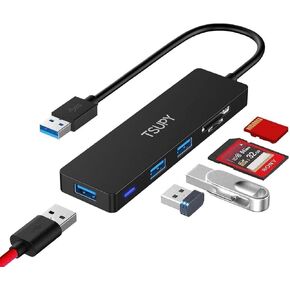
USB Hub 3.0، TSUPY 5 في 1 محول متعدد المنافذ USB 3.0 Hub مع قارئ بطاقة SD Micro SD، 3 منافذ USB 3.0 متوافقة مع أجهزة الكمبيوتر المحمول، MacBook، الكمبيوتر الشخصي، الطابعة، Surface Pro، محركات أقراص فلاش USB
KWD 4.500
-18%
USB Hub 3.0، TSUPY 5 في 1 محول متعدد المنافذ USB 3.0 Hub مع قارئ بطاقة SD Micro SD، 3 منافذ USB 3.0 متوافقة مع أجهزة الكمبيوتر المحمول، MacBook، الكمبيوتر الشخصي، الطابعة، Surface Pro، محركات أقراص فلاش USB
KWD 4.500
 محور USB للوحة الأمامية 5.25 بوصة مع 2 × منافذ USB 3.0 و2 × منافذ USB 2.0 و1 × منفذ صوت عالي الدقة 19 دبوس تمديد لقارئ بطاقات اللوحة الأمامية يدعم WinXP/2003/VISTA/2008/Windows 7/WIN8 32/64BIT/MAC
KWD 9
محور USB للوحة الأمامية 5.25 بوصة مع 2 × منافذ USB 3.0 و2 × منافذ USB 2.0 و1 × منفذ صوت عالي الدقة 19 دبوس تمديد لقارئ بطاقات اللوحة الأمامية يدعم WinXP/2003/VISTA/2008/Windows 7/WIN8 32/64BIT/MAC
KWD 9




