- التسوق ، اصبح سهلا.
- /
- احصل على التطبيق!
Technical Data
Model: ZA12
Built-in Lithium Battery: 7.4v, 300mAh, 2.22Wh
USB-C Port: Input:5V-- 0.5A
Charging Time: ≈1h 10min
Number of Flashes (Full Power): ≈400
Recycle Time (Full Power): ≈2.5s
Flash Power Steps: 7 steps: 1/64 to Full
Working Environment Temperature: -10C ~40°C
Sync Triggering: Hot Shoe
Dimension: ≈2.17"*1.85"*1.42"
Net Weight: ≈60g
Packing list:
Flash Body ×1
Charging Cord ×1
Diffuser ×1
Storage Bag ×1
1. Which Cameras Are Compatible with ZA-12? Cameras with a single-contact hotshoe and a central X-shaped universal contact point
2.Does ZA-12 Support Burst Shooting? Yes, but only at the lowest power setting (1/128).
3. Does ZA-12 Support TTL? No, manual mode only.
4. What Are the Functions of the Two Dials? Left dial: Adjusts aperture (F-stop). Right dial: Switches between ISO and flash power settings (1/1 to 1/128). Rotating the right dial toggles between Auto/Manual modes.
5. How to Reset ZA-12? Press and hold the power button, then rotate the left dial once. The unit will shut down after reset.
6.Why is ZA-12 not syncing with my camera? Ensure the dials are correctly aligned. If the dials are misaligned (pointing to blank spaces), the flash will not sync.
7. How to switch between Auto/Manual modes? Manual Mode: Rotate the right dial to adjust power (1/1 to 1/128). Auto Mode: Rotate the right dial to match your camera's ISO. 8. Why is ZA-12 overheating with a rapidly flashing yellow light? The flash is in thermal protection mode. Let it cool for 10 minutes before reuse.
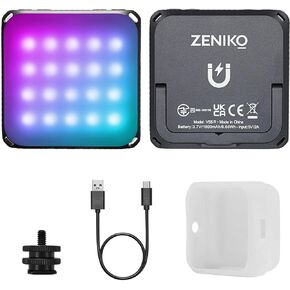 مصباح فيديو ZENIKO VS5 R LED مع ناشر ناعم، ضوء مستمر RGB بالألوان الكاملة للتصوير الفوتوغرافي لمدونة الفيديو المباشرة، HSI 36000 لون، 2500K-8500K، CRI 95+ TLCI 96+، التحكم في التطبيق، وردي
KWD 16
مصباح فيديو ZENIKO VS5 R LED مع ناشر ناعم، ضوء مستمر RGB بالألوان الكاملة للتصوير الفوتوغرافي لمدونة الفيديو المباشرة، HSI 36000 لون، 2500K-8500K، CRI 95+ TLCI 96+، التحكم في التطبيق، وردي
KWD 16
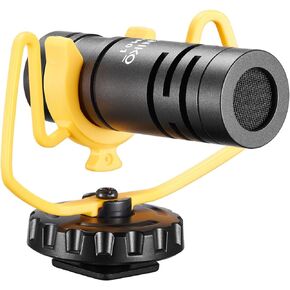 ميكروفون فيديو احترافي ZENIKO VM01، ميكروفون بندقية اتجاهي خفيف الوزن للكاميرا والهاتف الذكي مع واقي أمامي للصدمات Deadcat
KWD 9
ميكروفون فيديو احترافي ZENIKO VM01، ميكروفون بندقية اتجاهي خفيف الوزن للكاميرا والهاتف الذكي مع واقي أمامي للصدمات Deadcat
KWD 9
 OC-D1 ميكروفون ستيريو مزدوج للكاميرا الذكية، ميكروفون فيديو مع حامل للصدمات، ميكروفون مزدوج يدور 180 درجة، ميكروفون صغير الحجم
KWD 16
OC-D1 ميكروفون ستيريو مزدوج للكاميرا الذكية، ميكروفون فيديو مع حامل للصدمات، ميكروفون مزدوج يدور 180 درجة، ميكروفون صغير الحجم
KWD 16
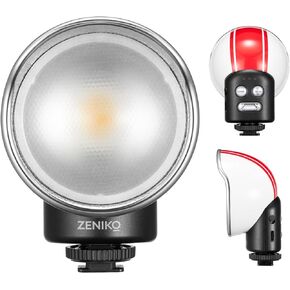 ZENIKO VC3 Bi Retro On Camera LED Video Light، إضاءة فيديو LED صغيرة مبتكرة مع عدسة فريسنل لتصوير فيديو Vlog للكاميرا، CCT 2500K-6500K 7 مستويات، سطوع 10 مستويات، مع مرشحات الألوان
KWD 16
ZENIKO VC3 Bi Retro On Camera LED Video Light، إضاءة فيديو LED صغيرة مبتكرة مع عدسة فريسنل لتصوير فيديو Vlog للكاميرا، CCT 2500K-6500K 7 مستويات، سطوع 10 مستويات، مع مرشحات الألوان
KWD 16




