- التسوق ، اصبح سهلا.
- /
- احصل على التطبيق!
How to pair the Bluetooth Beanie on your device?
Step 1: Confirm that your device's Bluetooth has been turned off, at the same time, the product is also turned off. Make sure its charged before trying to connect.
Step 2: Hold down the Play/Pause button 5 seconds, until the red and blue light flashes, first it will say“power on”, and KEEP holding it and it will finally say “pairing”. Then release your finger.
Step 3: Turn on Bluetooth on your device, then a name(Bluetooth Beanie) will show up under your Bluetooth devices. Click the name, Start pairing. When the product indicator light turn blue and you can hear
the sound of “Du Du Du” from the module, the connection is successful! You can use the product to listen to music, make phone calls and etc.
Specifications:
Bluetooth Version: 5.0
Transmission Distance: 44 ft (15 m)
Battery: LiPO(Lithium-Polymer Battery) 3.7 V 130 mAh
Play Time: Up to 10 hours
Standby Time: Up to 100 hours
Charging Time: 1.5 hours
Material: 60% Acrylic & 40% Polyester
Product Weight: 5 oz
Crown Size: 9 in. ± 0.6 in.
Height: 9 in. ± 0.6 in.
Package Contents:
1 x Bluetooth Beanie
1 x Micro USB Charging Cable
1 x User Manual
Note:
1.Please use Mic USB charging cable to charge the Beanie before you using the Bluetooth Beanie Hat.
2.Please note that you MUST remove the control panel & speaker before washing The Bluetooth Beanie.
 -24%
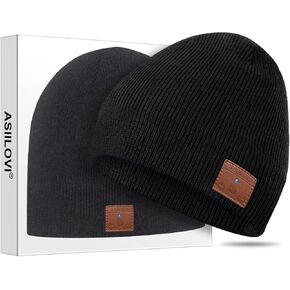
ASIILOVI قبعة بلوتوث، مبطنة بالصوف المزدوج بلوتوث 5.0 قبعة صغيرة لاسلكية شتوية دافئة مع مكبرات صوت MIC HD، تغليف هدايا، هدايا للرجال / النساء / المراهقين / عيد الشكر العائلي (001-أسود)
KWD 6.500
-24%
ASIILOVI قبعة بلوتوث، مبطنة بالصوف المزدوج بلوتوث 5.0 قبعة صغيرة لاسلكية شتوية دافئة مع مكبرات صوت MIC HD، تغليف هدايا، هدايا للرجال / النساء / المراهقين / عيد الشكر العائلي (001-أسود)
KWD 6.500
 -56%
PECHAR عيد الميلاد بلوزات النساء تيس الموسم عيد الميلاد قميص شجرة عيد الميلاد الرسومات تيز عطلة كم طويل البلوز القمم
KWD 5.500
-56%
PECHAR عيد الميلاد بلوزات النساء تيس الموسم عيد الميلاد قميص شجرة عيد الميلاد الرسومات تيز عطلة كم طويل البلوز القمم
KWD 5.500
 قبعة GADIEMKENSD للجري عالية الأداء، نسيج قابل للتمدد مع شبكة تهوية للتمرينات الخارجية
KWD 8
قبعة GADIEMKENSD للجري عالية الأداء، نسيج قابل للتمدد مع شبكة تهوية للتمرينات الخارجية
KWD 8
 ASIILOVI Bluetooth Beanie إصدار 2023، قبعة صغيرة بلوتوث مبطنة بالصوف بطبقة مزدوجة، هدايا تقنية فريدة للرجال / النساء / المراهقين / عيد الشكر العائلي (رمادي)
KWD 9
ASIILOVI Bluetooth Beanie إصدار 2023، قبعة صغيرة بلوتوث مبطنة بالصوف بطبقة مزدوجة، هدايا تقنية فريدة للرجال / النساء / المراهقين / عيد الشكر العائلي (رمادي)
KWD 9




