الاجهزه الالكترونيات الامريكية قد تحتاج الى محمول فولت من ١١٠ الى ٢٢٠.قد تحتاج إلى محول كهرباء
مميزات خاصة
【Upgrade Apple MFi Certified】Lightning to Ethernet Adapter is officially certified by Apple, stable and smooth in transmission.LAN Ethernet Adapter mainly solves the problem of instability of your wireless network/WiFi instability. Achieve wired network access, watch videos and play games are more smooth, get best enjoyable online experience.10Mbps/100Mbps Ethernet provides access to super-fast internet network speeds at home or office.
【Universal Compatibility】Apple Lightning Ethernet adapter works with iPhone 13/13 Pro/13 Pro Max/12/12 Mini/12 Pro/12 Pro Max/SE 2020/11/11 Pro/11 Pro Max/XR/XS/XS Max/X 8 7 6 5, iPad/iPad Air /iPad Air 2 and iPod Pro. Ethernet Adapter Compatible with Lightning iOS 15. Support aLL iOS 10.3/11/12/13/14/15 system.
【Plug and Play】Just plug it in, no software or manual driver to install, no hassle. Get online in seconds whether you're at home, in the office, or on the go. Perfect for quick setup on laptops, tablets, and smartphones so you can stay connected for work, streaming, and gaming without interruptions.
【Small Adapter, Big Attention to Detail】 The Lightning to ethernet features a durable aluminum alloy case for faster heat dissipation than plastic. Its reinforced cable tail and wear-resistant port ensure long-lasting durability. Compact size and easy to carry
【Fashion Design】Small and compact design makes it easy to take this rj45 adapter with you wherever you may go without WiFi.iPad Ethernet adapter allows you to connect your iOS system to the Internet when WiFi is inconsistent or unavailable.
وصف
Widely Compatible:
for iPhone 13/13 Pro/13 pro max
for iPhone 12 Pro Max/12 Pro/12/12 mini
for iPhone 11/11 Pro Max/11 Pro
for iPhone XS Max/XS/XR/X
for iPhone 8/8 Plus
for iPhone 7/7 Plus
Pad Pro 12.9-inch/Pro10.5-inch/Pro 9.7-inch, Pad Mini 4/Mini 3/Mini 2, Pad Air/Air2. Support iOS 10 and up.
How to Use?
1. Turn off Wi-Fi on your iPad or iPhone.
2. Insert your router-connected Ethernet cable into Ethernet port of adapter, and connect the Iightning end into your Pad or Phone.
3. Go to"Setting" in your Pad or Phone and Click the "Ethernet" to obtain an IP address.
4. Open Safari and check whether the network can be used normally.
What you get:
RJ45 Ethernet Adapter
 devolo Magic 2 LAN Triple Powerline Add-on | 2000 ميجابت في الثانية | غ.هن موجة 2 | 1 محول العبور | منافذ LAN 3x جيجا بايت | التوصيل والتشغيل | قم بتوسيع شبكة devolo Magic الحالية
KWD 29
devolo Magic 2 LAN Triple Powerline Add-on | 2000 ميجابت في الثانية | غ.هن موجة 2 | 1 محول العبور | منافذ LAN 3x جيجا بايت | التوصيل والتشغيل | قم بتوسيع شبكة devolo Magic الحالية
KWD 29
![Lightning to Ethernet، هاتف 2 في 1 إلى obd2، أدوات موصل إيثرنت كابل ENET Rj45 إلى كابل واجهة obd ترميز F-Series 10/100Mbps عالي السرعة، محول إيثرنت مع منفذ شحن، التوصيل والتشغيل [أبيض] in Kuwait](https://cdn1.tilga.com/md/prod/2/390/3/48925290.48972.jpg) Lightning to Ethernet، هاتف 2 في 1 إلى obd2، أدوات موصل إيثرنت كابل ENET Rj45 إلى كابل واجهة obd ترميز F-Series 10/100Mbps عالي السرعة، محول إيثرنت مع منفذ شحن، التوصيل والتشغيل [أبيض]
KWD 11.500
Lightning to Ethernet، هاتف 2 في 1 إلى obd2، أدوات موصل إيثرنت كابل ENET Rj45 إلى كابل واجهة obd ترميز F-Series 10/100Mbps عالي السرعة، محول إيثرنت مع منفذ شحن، التوصيل والتشغيل [أبيض]
KWD 11.500
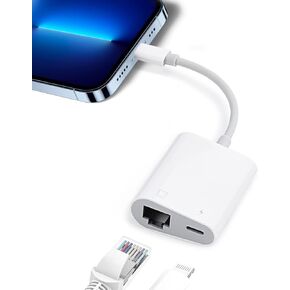 محول لايتنينج الى ايثرنت، محول شبكة LAN ايثرنت ار جيه 45 2 في 1 مع منفذ شحن للموبايل، ايباد بسرعة عالية 10/100 ميجابت لكل ثانية، التوصيل والتشغيل
KWD 7
محول لايتنينج الى ايثرنت، محول شبكة LAN ايثرنت ار جيه 45 2 في 1 مع منفذ شحن للموبايل، ايباد بسرعة عالية 10/100 ميجابت لكل ثانية، التوصيل والتشغيل
KWD 7
 محول بلوتوث طويل المدى من الفئة 1 للكمبيوتر الشخصي، محول بلوتوث QGOO USB للكمبيوتر الشخصي 5.3+EDR، جهاز استقبال بلوتوث دونجل يدعم Windows10/8.1/8/7 (برتقالي-236)
KWD 4.500
محول بلوتوث طويل المدى من الفئة 1 للكمبيوتر الشخصي، محول بلوتوث QGOO USB للكمبيوتر الشخصي 5.3+EDR، جهاز استقبال بلوتوث دونجل يدعم Windows10/8.1/8/7 (برتقالي-236)
KWD 4.500




