- التسوق ، اصبح سهلا.
- /
- احصل على التطبيق!
🔌 What is an HDMI Dummy Plug?
An HDMI dummy plug (also known as a display emulator or virtual display adapter) is a small device that simulates the presence of a monitor when plugged into the HDMI port of a computer or GPU. Once connected, the operating system detects it as a real display, thereby activating the GPU and enabling full graphics performance—even without a physical monitor.
🚀 Why Use an HDMI Dummy Plug?
Many GPUs disable hardware acceleration or reduce resolution output when no monitor is detected. This can cause:
Low-resolution displays in remote desktop sessions
Black/white screens when working headless
Unstable GPU behavior during operations like mining
With an HDMI dummy plug, these issues are solved by creating a virtual monitor, allowing the GPU to run at full performance.
Common Use Cases :
Cryptocurrency Mining:
Keeps the GPU active to avoid idle state or driver failure, ensuring stable performance and hardware acceleration.
Remote Work & IT Management:
Simulates a high-resolution display for remote desktop tools like RDP, TeamViewe-r, or AnyDes-k, allowing smoother operation and better control.
Game Streaming & Cloud Gaming:
Required for platforms such as Stea-m Remote Pla-y, Moonligh-t, or Parse-c, where GPU output must be active for real-time video streaming.
Machine Learning & AI Training:
Enables GPU output on headless servers, allowing frameworks like TensorFlo-w or PyTorc-h to run CUDA-based tasks smoothly.
Media Centers & Home Theaters (HTPC):
Prevents screen blanking or resolution issues when using headless media servers like Ple-x, Kod-i, or VLC with HDMI output.
Server or Workstation Monitoring:
Keeps display output alive for remote monitoring or diagnostics without needing a physical monitor.
Video Capture & Recording Setups:
Simulates a display for capture cards or streaming systems that require a constant signal source.
Virtual Reality (VR) Configuration:
Allows VR headsets (e.g., Oculu-s Rift, HTC Viv-e) to function correctly on PCs without a monitor attached.
Multi-Monitor Testing & Development:
Emulates extra screens for developers or testers who need to simulate multi-display environments without physical monitors.
Main Features & Use Cases:
✅ 1. Enable GPU Hardware Acceleration
When no display is detected, some dedicated graphics cards disable hardware acceleration or enter low-power mode. The HDMI Dummy Plug simulates a connected monitor, forcing the GPU to activate and deliver full graphical performance.
✅ 2. Virtual High-Resolution Display Output
Supports multiple resolutions . Even without a physical monitor, it enables remote desktop access, video rendering, and screen recording at high resolutions, avoiding blurry visuals or limited functionality.
✅ 3. Stable Remote Desktop Experience
Headless systems often suffer from black screens, white screens, or UI misalignment during remote access. The Dummy Plug creates a virtual desktop to ensure a clear, stable, and fully functional remote display.
✅ 4. Support for GPU Computing Tasks
Applications like AI training, deep learning, and graphic rendering rely on CUDA or OpenC-L. The Dummy Plug keeps the GPU active in headless servers, allowing proper driver loading and uninterrupted GPU computing.
✅ 5. Prevent System Lock or Screen Sleep
During long-running tasks such as rendering, mining, updates, or backups, the Dummy Plug prevents the system from locking or entering sleep mode due to perceived inactivity.
✅ 6. VR Device Compatibility
Some VR headsets require an active display connection to function. The Dummy Plug enables VR use on PCs without monitors, ideal for development, demos, or kiosk displays.
✅ 7. Multi-Monitor Simulation and Display Testing
Emulates a second or third display for testing, development, or demo purposes. No need to purchase additional monitors to simulate a multi-screen environment.
✅ 8. Video Capture and Streaming Output
Some capture cards or streaming devices require a stable HDMI signal source. The Dummy Plug provides continuous virtual video output, ensuring proper operation of capture systems.
✅ 9. Plug and Play with Broad Compatibility
No drivers, power, or setup needed—simply plug and use. Fully compatible with all major operating systems including Windows, macOS, Linux, and more.
✅ 10. Compact, Portable, and Efficient
Smaller than a finger, heat-free, and ultra-low power. Easy to carry and ideal for technicians, developers, and remote users needing a lightweight display solution.
✅11.Solve the problem that the remote resolution is low and cannot be operated.
✅12.Supported Resolutions and Refresh Rates:
7680 x 4320@30Hz
4096 x 2160@60/119.88/120 Hz
3840x2160@60/119.88/120 Hz (Recommended)
2560 x1600@60/119.88/120 Hz
2560 x1440@60/119.88/120/144 Hz
2560 x1080@60/119.88/120/144 Hz
2048 x1536@60/119.88/120/144 Hz
1920 x1440@60/119.88/120/144 Hz
1920x1200@60/119.88/120/144 Hz
1920 x1080@60/119.88/120/144 Hz
1680 x1050@60/119.88/120/144 Hz
1600 x1200@60/119.88/120/144 Hz
1600 x1024@60/119.88/120/144 Hz
1600 x900@60/119.88/120/144 Hz
1440x1080@60/119.88/120/144 Hz
1440 x900@60/119.88/120/144 Hz
1366 x768@60/119.88/120/144 Hz
1360x768@60/119.88/120/144 Hz
1280 x1024@60/119.88/120/144 Hz
1280 x960@60/119.88/120/144 Hz
1280 x800@60/119.88/120/144 Hz
1280 x768@60/119.88/120/144 Hz
1280 x720@60/119.88/120/144 Hz
1176 x664@60/119.88/120/144 Hz
1152 x864@60/119.88/120/144 Hz
1024 x768@60/119.88/120/144 Hz
800 x600@60/119.88/120/144 Hz
8K at 30Hz & All 120Hz Resolutions
Bit Depth: 8-bit
Color Format: YCbCr 4:2:0
Color Space: Standard Dynamic Range (SDR)
2K – 2560 x 1440 @ 60 / 119.88 / 144 Hz
Bit Depth: 8-bit (Dithered)
Color Format: RGB
Color Space: Standard Dynamic Range (SDR)
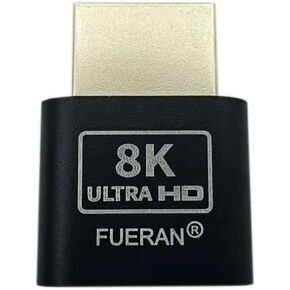 FUERAN 2K 4K 8K HDMI Dummy Plug-Virtual Monitor Display Emulator محول بدون رأس 3840x2160@60 هرتز 1080@120HDR DVI EDID Emulator (4K-1080@120-3840x2160@60)
KWD 2.500
FUERAN 2K 4K 8K HDMI Dummy Plug-Virtual Monitor Display Emulator محول بدون رأس 3840x2160@60 هرتز 1080@120HDR DVI EDID Emulator (4K-1080@120-3840x2160@60)
KWD 2.500
 -18%
فيران محاكي شاشة عرض جوست بدون راس بمنفذ HDMI (يناسب الجيل الجديد 1920x1080 بتردد 60 هرتز)، عبوة من 6 قطع
KWD 7
-18%
فيران محاكي شاشة عرض جوست بدون راس بمنفذ HDMI (يناسب الجيل الجديد 1920x1080 بتردد 60 هرتز)، عبوة من 6 قطع
KWD 7
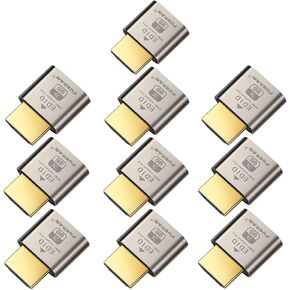 قابس HDMI مناسب لمحاكي العرض بدون راس من 10 قطع، فيران DDC EDID بدون راس مع ويندوز ماك او اس اكس لينكس محول شاشة افتراضية عالي الدقة 1920x1080@60Hz
KWD 12.500
قابس HDMI مناسب لمحاكي العرض بدون راس من 10 قطع، فيران DDC EDID بدون راس مع ويندوز ماك او اس اكس لينكس محول شاشة افتراضية عالي الدقة 1920x1080@60Hz
KWD 12.500
 فيران قابس VGA وهمي، شبح بدون رأس، محاكي عرض يناسب بدون راس 1920x1080@60hz)
KWD 3.500
فيران قابس VGA وهمي، شبح بدون رأس، محاكي عرض يناسب بدون راس 1920x1080@60hz)
KWD 3.500




