- التسوق ، اصبح سهلا.
- /
- احصل على التطبيق!
Production Introduction For Useing PS5 Controller Dual Charging Dock:
The PS5 Controller Dual Charging Dock Is Designed Especially For The PS5 Controller. It Can Charge Two PS5 Controllers Simultaneously With Type-C Adapter, Which Is Easy To Be Inserted In Or Pulled Out Form Controller Charging, And Effectively Protects The Charging Interface Of The Controller From Wear. The Charging Is Indicated With Red And Green Lamps: The Intelligent Micro Control Technology Is Applied To Circuit Management To Achieve High-Efficiency Conversion Charging; This Product Is Of Unique Decorations, Beautiful Appearance And Simple To Use, Which Is A Must For Game Players.
Product Features:
1. The Intelligent Micro Control Technology Is Adopted In Output Management
2. It Can Charge Two PS5 Controllers Simultaneously
3. Type-C Adapter Is Used For Charging, Which Is Easy To Be Inserted In Or Pulled Out Form Controller Charging And Effectively Protects The Charging Interface Of The Controllers From Wear
4. Creen And Red Charge Lamps Are Simple And Easy To Be Understood
5. Aesthetic Appearance With Convenient Placement
6. Low Power Consumption In Standby, Energy Saving And Environment Protection
Charging Instruction For Useing PS5 Controller Dual Charging Dock:
1. The Power Adapter Of 5v 2a Type-C Interface Or The Power Adapter Of Usb Interface Can Be Used For Power Supply.
2. After The Charging Source Is Connected, The Charge Lamp Shall Show The Green Light.
3. After Inserting The Type C Adapter Into The Controller, Put It On The Charging Stand For Charging.
4. In Case Of Charging The Controllers, The Corresponding Charge Lamp Should Be In Red; When The Controller Is Fully Charged, The Corresponding Indicator Lamp Should Turn Green.
Anotice For Useing PS5 Controller Dual Charging Dock:
1. When The Charge Level Of The Controller Reaches About 80% Or More, If You Remove The Controller And Then Plug It In, The Controller May Not Be Charged Due To The Battery Protection Function;
You Can Continue To Charge Only After The Battery Level Of The Controller Is Below 80%.
2. The 5v Power Adapter With Current Over 2a Shall Be Used For Power Supply.
If The Power Supply Power Of The Power Adapter Is Insufficient The Charging Indicator May Flash Without Charging, In Which Case The Power Supply With Larger Power Shall Be Used.
3. If The Usb Interface Of The Console Is Used And The Output Power Current Is Less Than 2a The Charging Of The Controller May Be Failed Due To Insufficient Power Of Supply When 2 PS5 Controllers Are Being Charged Simultaneously, Thus The Power Adapter With Larger Power Shall Be Used.
Matters Needing Attention For Useing PS5 Controller Dual Charging Dock:
1. The Power Adapter Should Be Unplugged When The Product Is Fully Charged Or Not In Use.
2. This Product Cannot Be Used And Stored In Humid Environment.
3. This Product Should Be Used Or Stored By Avoiding Dusts And Heavy Loads To Guarantee Its Service Life.
4. Please Do Not Use The Product Which Is Soaked, Crashed Or Broken And With Electrical Performance Problems Caused By Improper Use.
5. Do Not Use External Heating Equipment Such As Microwave Ovens For Drying.
6. If It Is Damaged, Please Send It To The Maintenance Department For Disposal. Do Not Disassemble It By Yourself.
7. Keep This Product Away From Children.
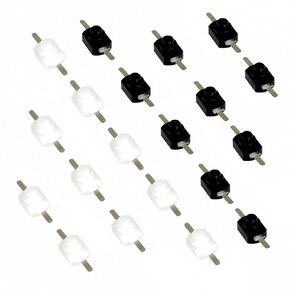 20 قطعة 1208YD تيار مستمر 30 فولت 1 أمبير أسود + أبيض مفتاح زر ضغط صغير قفل ذاتي صغير مفتاح تشغيل وإيقاف مفتاح صغير لمصباح يدوي ومنفذ حائط إلكتروني يمكنك صنعه بنفسك
KWD 3
20 قطعة 1208YD تيار مستمر 30 فولت 1 أمبير أسود + أبيض مفتاح زر ضغط صغير قفل ذاتي صغير مفتاح تشغيل وإيقاف مفتاح صغير لمصباح يدوي ومنفذ حائط إلكتروني يمكنك صنعه بنفسك
KWD 3
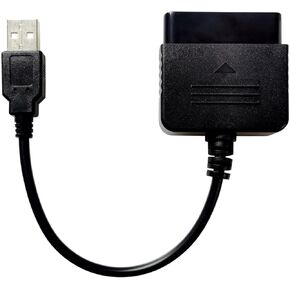 متوافق/بديل لوحدة تحكم PS2 إلى كابل محول محول USB، متوافق/بديل لوحدة تحكم PlayStation 2 PS2 إلى وحدة تحكم PS3/PC
KWD 3
متوافق/بديل لوحدة تحكم PS2 إلى كابل محول محول USB، متوافق/بديل لوحدة تحكم PlayStation 2 PS2 إلى وحدة تحكم PS3/PC
KWD 3
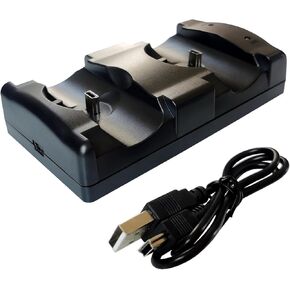 محطة شاحن وحدة تحكم PS3 متوافقة/بديلة 2 في 1 مع مؤشر ضوء LED، وكابل شحن، وقاعدة شحن لجهاز PlayStation 3 PS3 المزدوج ووحدة التحكم المتحركة
KWD 3.500
محطة شاحن وحدة تحكم PS3 متوافقة/بديلة 2 في 1 مع مؤشر ضوء LED، وكابل شحن، وقاعدة شحن لجهاز PlayStation 3 PS3 المزدوج ووحدة التحكم المتحركة
KWD 3.500
 4 متر 16 سلك 1.27 ملم درجة لون قوس قزح شريط مسطح كابل IDC سلك كابل 28 AWG UL2651 (16 سلك 4 متر)
KWD 3
4 متر 16 سلك 1.27 ملم درجة لون قوس قزح شريط مسطح كابل IDC سلك كابل 28 AWG UL2651 (16 سلك 4 متر)
KWD 3




