- التسوق ، اصبح سهلا.
- /
- احصل على التطبيق!
How to Set the Wireless Retro Game Stick
1. Insert the TF card into the controller before connecting the power supply.
2. Plug the game stick into the HDMI port of your TV or computer.
3. Connect to power then the console will automatically turn on.
4. Utilize the game controller to choose the desired game from the menu.
Product Includes:
1 X Game Stick
2 X Wireless Controllers
1 X HDMI Cable
1 X Usb Cable
1 X 64G TF Card
1 X User Manual
If the retro stick does not work, the device may not properly connected, you can check as following steps:
1. Make sure the switch of the controller is in the ON state.
2. Make sure the controller is lit red or green (red for player 1, green for player 2);
3. Make sure the Bluetooth wireless receiver is well inserted into the retro stick;
4. Make sure the stick lights up blue;
5. If the connection is correct, the primary controller (player 1) is red and the secondary controller (player 2) is green.
6. If the indicator lights are flashing at the same time, it means that the battery is low or the wireless receiver has not been successfully connected.
(1) If the battery is low, replace the batteries of the controller.
(2) If the Bluetooth wireless receiver connection is not successful, (may not be able to read the retro stick), please pull out the wireless receiver in the shutdown state and reinsert.
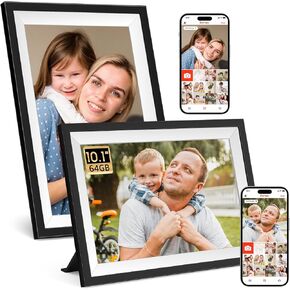 إطار صور رقمي Frameo، إطار صور رقمي ذكي مقاس 10.1 بوصة، واي فاي، شاشة لمس IPS 1280 × 800، سعة تخزين كبيرة 64 جيجابايت، تحميل من الهاتف، دوران تلقائي، مشاركة Pohto أو الفيديو على الفور
KWD 27.500
إطار صور رقمي Frameo، إطار صور رقمي ذكي مقاس 10.1 بوصة، واي فاي، شاشة لمس IPS 1280 × 800، سعة تخزين كبيرة 64 جيجابايت، تحميل من الهاتف، دوران تلقائي، مشاركة Pohto أو الفيديو على الفور
KWD 27.500
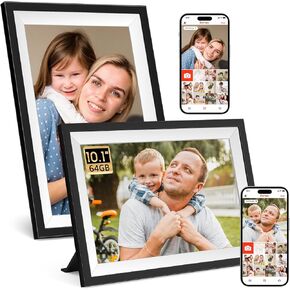 إطار صورة رقمي Frameo، إطار صور رقمي WiFi مقاس 10.1 بوصة، شاشة لمس IPS 1280x800، سهولة التحميل من الهاتف إطار رقمي 64 جيجابايت، دوران تلقائي، مشاركة Pohto أو الفيديو بواسطة إطار الصورة الإلكتروني
KWD 47.500
إطار صورة رقمي Frameo، إطار صور رقمي WiFi مقاس 10.1 بوصة، شاشة لمس IPS 1280x800، سهولة التحميل من الهاتف إطار رقمي 64 جيجابايت، دوران تلقائي، مشاركة Pohto أو الفيديو بواسطة إطار الصورة الإلكتروني
KWD 47.500
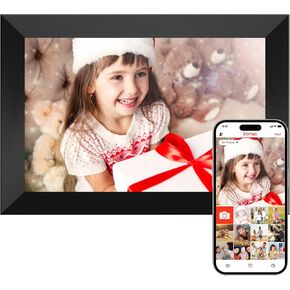 إطار صور رقمي من Frameo واي فاي، إطار صور ذكي 10.1 بوصة، شاشة لمس IPS 1280 × 800، تدوير تلقائي، عرض شرائح، إعداد سهل، مشاركة الصور ومقاطع الفيديو في أي مكان، هدية مثالية لعيد الميلاد
KWD 16.500
إطار صور رقمي من Frameo واي فاي، إطار صور ذكي 10.1 بوصة، شاشة لمس IPS 1280 × 800، تدوير تلقائي، عرض شرائح، إعداد سهل، مشاركة الصور ومقاطع الفيديو في أي مكان، هدية مثالية لعيد الميلاد
KWD 16.500
 -8%
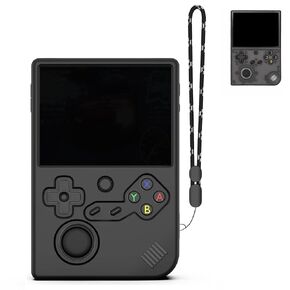
بالنسبة إلى حالة حماية السيليكون RG40XXV ، فإن العلبة الناعمة لـ ANBERNIC RG 40XXV فقط ، من أجل RG 40XX V Retro ، إكسسوارات وحدة التحكم في اللعبة المحمولة ، علبة السيليكون القابلة للغسل مع الحبل (الأسود)
KWD 5.500
-8%
بالنسبة إلى حالة حماية السيليكون RG40XXV ، فإن العلبة الناعمة لـ ANBERNIC RG 40XXV فقط ، من أجل RG 40XX V Retro ، إكسسوارات وحدة التحكم في اللعبة المحمولة ، علبة السيليكون القابلة للغسل مع الحبل (الأسود)
KWD 5.500




